Welcome to the most critical step in your journey toward financial self-sovereignty: choosing and securing your first cryptocurrency wallet.
When newcomers hear the term "crypto wallet," they often visualize a digital leather billfold holding actual digital coins. This mental image is misleading, and understanding the reality is crucial for security. A cryptocurrency wallet does not store currency; it stores the cryptographic keys required to access and spend your funds on the blockchain. Think of the blockchain as the public ledger, and your wallet as the key to your specific entry on that ledger.
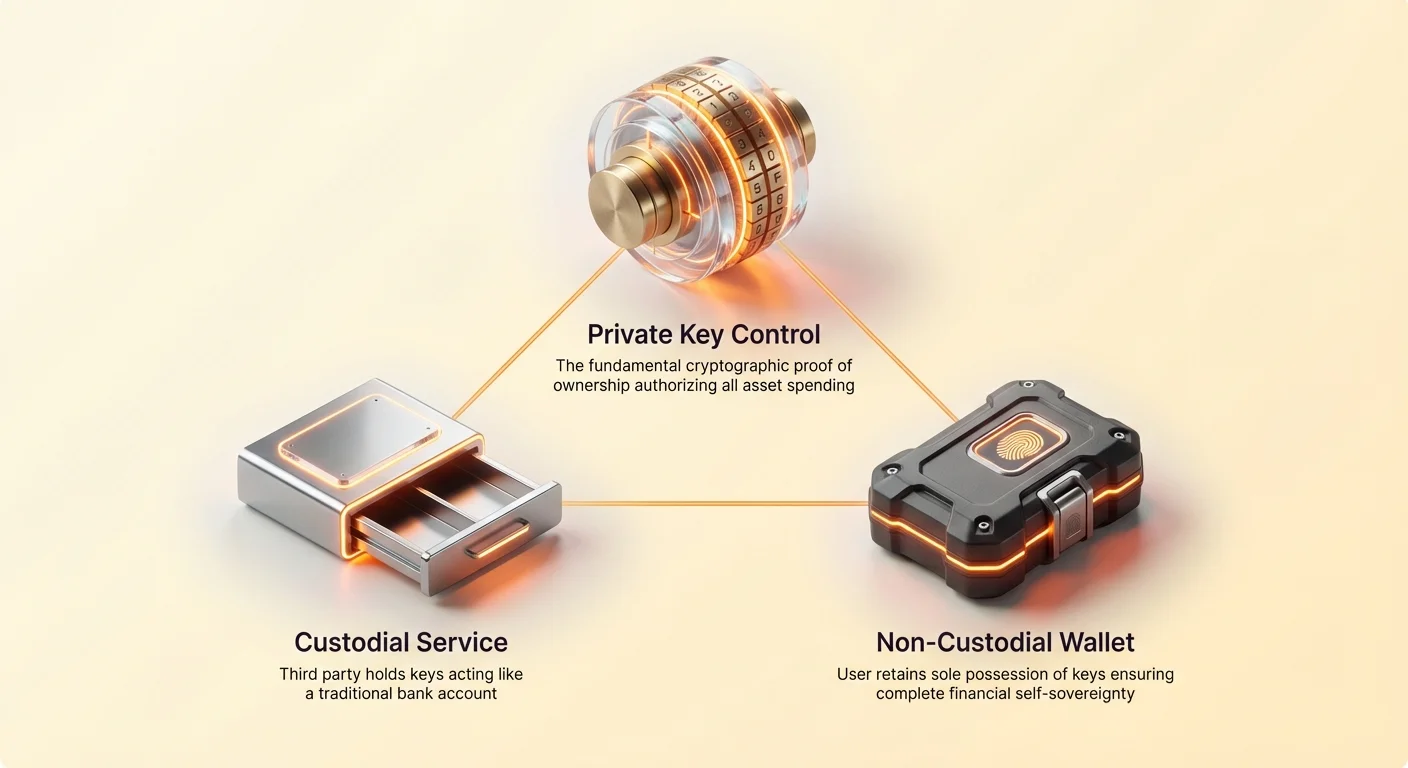
The fundamental choice you face is not which brand of wallet to use, but rather: Who holds the keys? Do you trust a third party (like an exchange) to hold the keys for you (custodial), or do you take on the sole responsibility of protecting them yourself (non-custodial)? This single decision determines your security, your accessibility, and your ultimate degree of control over your assets. This guide provides a comprehensive framework to help you navigate this choice, ensuring you start your journey with maximum security and confidence.
The Foundation: Understanding the Private Key
Before diving into wallet types, we must solidify the foundational concept: the private key. If Bitcoin is digital gold, the private key is the unique combination to the vault that contains your gold.
Analogy: The Wallet is the Key Ring, the Key is the Access Code
In the physical world, if you lose your house key, you call a locksmith or use a spare hidden under a mat. If you lose your crypto private key, there is no master key, no customer service line, and no recovery option. The funds associated with that key are permanently lost and inaccessible.
A crypto wallet is essentially a software application designed to generate, manage, and utilize these private keys securely.
- Public Key (The Address): This is your receiving address—like your bank account number or email address. You can share this freely with anyone who wants to send you funds. It is derived mathematically from your private key.
- Private Key (The Password): This is the secret, alphanumeric code that proves ownership and authorizes spending. If someone obtains your private key, they can spend your funds instantly and irreversibly.
The core principle of self-sovereignty in crypto is simple: He who controls the private key controls the money.
The Danger of Loss and Irreversible Transactions
Because decentralized networks like Bitcoin operate without intermediaries, every transaction is final. There are no chargebacks, no "forgot password" buttons, and no mechanisms to reverse funds sent to the wrong address. This lack of intervention is a feature, not a bug, but it places the full burden of security onto the user.
If you lose control of your private key (due to a hacking attempt, device failure, or simply forgetting it), your Bitcoin is locked forever. Conversely, if you are the only person who knows the key, your funds are secured against censorship, government seizures, or bank failures. Understanding this trade-off—complete control versus complete responsibility—is the first step in wallet selection.
The Core Decision: Custodial vs. Non-Custodial Wallets
The choice between custodial and non-custodial wallets is the most important fork in the crypto roadmap. It defines whether you are outsourcing your security or taking on the burden yourself.
Custodial Wallets: Trusting a Third Party (The Exchange Model)
A custodial wallet is one where a third party—typically a centralized cryptocurrency exchange (CEX) or a specialized custodian service—holds and manages your private keys on your behalf.
How it Works: When you buy crypto on an exchange like Coinbase, Binance, or Kraken and leave the assets in their default account, you are using a custodial wallet. The exchange holds the massive master private key for all customer funds. You access your funds using a traditional username and password, just like a bank account.
| Pros of Custodial Wallets | Cons of Custodial Wallets |
|---|---|
| Convenience: Easy setup; quick access for trading. | Counterparty Risk: If the custodian is hacked, goes bankrupt (like FTX), or commits fraud, your funds are at risk. |
| Recovery: If you forget your password, the custodian can recover your account for you, much like a bank. | Censorship Risk: The custodian can freeze or block your account if mandated by a government or internal policy. |
| Beginner Friendly: Requires no technical knowledge of key management or seed phrases. | "Not Your Keys, Not Your Coin": You do not truly own the assets; you own an IOU from the platform. |
Use Case: Custodial wallets are best suited for small amounts of funds designated for immediate trading, or for absolute beginners who are still learning the basics of the ecosystem and prioritizing ease of use over ultimate security.
Non-Custodial Wallets: Self-Sovereignty (The Personal Vault Model)
A non-custodial wallet (also called self-custody or sovereign wallet) is one where you and only you have control of the private keys. The wallet software merely helps you store and manage these keys.
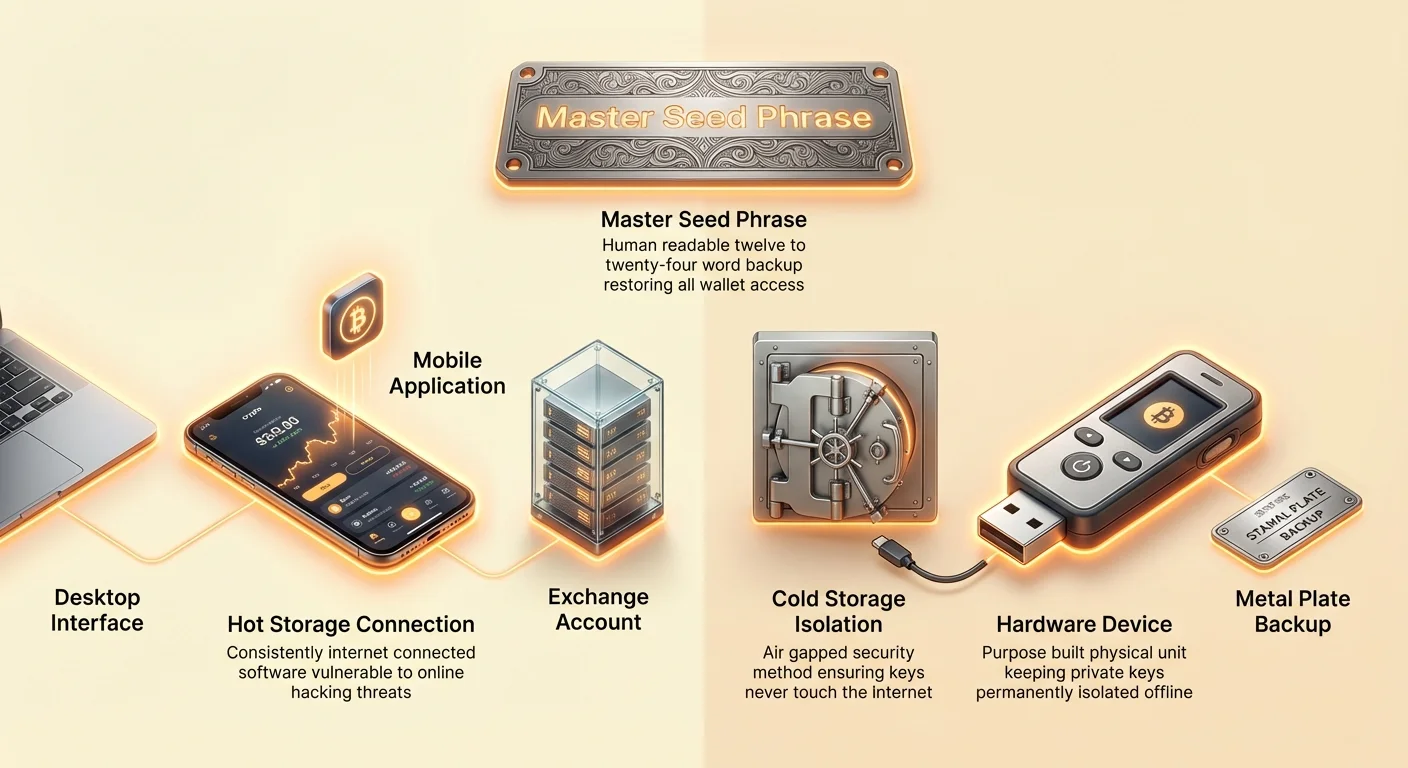
How it Works: When you set up a non-custodial wallet (like Trust Wallet, Exodus, or a dedicated hardware wallet), the software generates a unique set of private keys and presents you with a Seed Phrase (or Mnemonic Phrase)—a sequence of 12 to 24 simple words. This seed phrase is the human-readable master backup of all your private keys. You are solely responsible for protecting this phrase.
| Pros of Non-Custodial Wallets | Cons of Non-Custodial Wallets |
|---|---|
| Absolute Control: No third party can freeze, seize, or block your assets. | Zero Recovery Options: If you lose your seed phrase, the crypto is permanently gone. |
| Security: Funds are generally safer from exchange hacks, political instability, and censorship. | Irreversible Mistakes: Sending funds to the wrong address or falling for a phishing scam is your sole responsibility. |
| Access to DeFi: Necessary to interact with decentralized applications, lending, staking, and Web3 services. | Requires Diligence: Demands rigorous security practices (proper seed phrase storage, device hygiene). |
Use Case: Non-custodial wallets are mandatory for long-term savings, significant investments, and anyone seeking true financial autonomy. This is the goal for anyone serious about the philosophy of cryptocurrency.
Decision Framework: Who Should Use Which?
The decision boils down to balancing security needs with your technical confidence:
| User Profile | Recommended Custody Type | Why? |
|---|---|---|
| The Trader (High frequency, small amounts) | Primarily Custodial | Speed, ease of moving assets, leveraging exchange tools. |
| The Long-Term HODLer (Savings, investments) | Strictly Non-Custodial | Maximum protection against systemic risk and exchange collapse. |
| The New Beginner (First few hundred dollars) | Start Custodial, Transition Quickly | Easiest learning curve; buy on the exchange, but practice moving small amounts to a non-custodial mobile wallet immediately. |
| The Experienced User (Large portfolios) | Non-Custodial with Cold Storage | Complete self-sovereignty and air-gapped security for the majority of funds. |
Security Framework 1: Hot vs. Cold Storage
Once you have decided on self-custody (non-custodial), the next layer of security is determined by how often your private keys are exposed to the internet. This introduces the concepts of "Hot" and "Cold" storage.
Hot Wallets (Always Connected)
A hot wallet is any wallet where the private keys are stored on a device that is consistently connected to the internet. This includes applications running on your smartphone, computer, or even web browser extensions.
Characteristics:
- Convenience: Perfect for daily transactions, quick payments, and interacting with Web3 applications (Decentralized Finance or NFTs).
- Vulnerability: Because the keys are online, they are theoretically vulnerable to malware, viruses, phishing attacks, and remote hacking attempts if your device security is compromised.
Examples of Hot Wallets:
- Mobile Wallets (e.g., Trust Wallet, Exodus Mobile): Excellent for portability and small, spending amounts.
- Desktop Wallets (e.g., Electrum, Exodus Desktop): Offers a full feature set but relies entirely on the security of the host computer.
- Web/Browser Extension Wallets (e.g., MetaMask): Crucial for interacting with specific blockchains and decentralized applications, but requires extreme caution regarding permissions.
Rule of Thumb: Never store more funds in a hot wallet than you would keep in your physical wallet when walking down the street.
Cold Wallets (Air-Gapped Protection)
A cold wallet is a device or method that stores private keys entirely offline, meaning they are "air-gapped"—physically separated from any internet-connected system. This provides the highest level of security available.
Characteristics:
- Security: Immune to all online threats (viruses, malware, remote hacks, etc.). The keys never touch an internet connection.
- Inconvenience: Transactions require a physical step (plugging in the device, entering a PIN), making them unsuitable for frequent spending.
The Cold Standard: Hardware Wallets
The most popular and recommended form of cold storage is a hardware wallet (e.g., Ledger, Trezor, Coldcard). These are purpose-built, highly secure physical devices that do one job: generating and storing your private keys offline.
When you want to send a transaction:
- You create the transaction on your computer or phone (a hot device).
- The transaction data is sent to the hardware wallet via USB or Bluetooth.
- The hardware wallet signs the transaction internally using the offline private key.
- The signed, completed transaction is sent back to the hot device for broadcasting to the network.
The key never leaves the secure chip inside the hardware device, guaranteeing that your keys remain protected even if the computer you are using is riddled with malware.
When to Use a Hardware Wallet: As soon as your crypto holdings exceed an amount you would be genuinely upset to lose (e.g., more than a few thousand dollars), it is time to invest in a hardware wallet. It is the cheapest and most effective insurance policy you can buy in the crypto world.
Security Framework 2: Deep Dive into Non-Custodial Options
For those choosing the self-custody path, selecting the right type of wallet depends on usage patterns and the level of security required.
1. Mobile Wallets: Convenience and Small Amounts
Mobile wallets are software applications installed on your smartphone (Android or iOS). They are hot wallets that offer excellent accessibility.
- Pros: Highly portable, easy to generate new addresses, and ideal for scanning QR codes for payments.
- Cons: Smartphones are inherently less secure than dedicated hardware. They are susceptible to physical theft, screen scraping malware, and "sim swap" attacks (where an attacker reroutes your phone number to their device to bypass 2FA).
- Best Practice: Enable biometric security (fingerprint/Face ID) on the app itself, and avoid installing the wallet on a phone used for risky activities (e.g., unknown app downloads, jailbreaking).
2. Desktop Wallets: Power and Features
Desktop wallets are software programs installed directly onto your personal computer (PC or Mac).
- Pros: Often offer more advanced features, greater visual clarity, and compatibility with dedicated trading tools or full node operation.
- Cons: If your computer is compromised (e.g., through a malicious email attachment or infected software), your desktop wallet is easily compromised.
- Security Tip: If using a desktop wallet for significant funds, dedicate a clean, separate computer used only for crypto management, or better yet, pair the desktop software with a hardware wallet for signing transactions.
3. The Gold Standard: Hardware Wallets
Hardware wallets should be viewed not just as a choice, but as the eventual requirement for any serious investor in cryptocurrency.
- The Transaction Signature Process: The critical function of a hardware wallet is to keep the private key physically isolated. When you confirm a transaction, you must visually verify the receiving address and amount on the device's small screen before pressing a button to sign the transaction. This "trusted display" prevents a hacker from manipulating the transaction details on your compromised computer without your knowledge.
- Purchase Caution: Always buy hardware wallets directly from the manufacturer. Never buy a used or second-hand device, or one from an unauthorized reseller like Amazon or eBay, as they could be tampered with to steal your keys upon initialization.
The Single Most Important Concept: Mastering Your Seed Phrase
The seed phrase (or mnemonic phrase) is the human-readable backup of your non-custodial wallet. It is typically a list of 12, 18, or 24 words, generated sequentially according to industry standards (BIP39).
What is a Seed Phrase? (The Master Backup Key)
When you initialize a non-custodial wallet (software or hardware), the device generates a master private key and converts it into the seed phrase.
Importance:
- Recovery: If your physical hardware wallet breaks, your phone is lost, or your computer crashes, you can enter this 12- or 24-word phrase into any compatible wallet software or hardware device. It will mathematically regenerate all of your private keys, restoring access to your funds.
- Master Key: The seed phrase is the single, absolute key to all crypto assets associated with that wallet.
A Fundamental Rule: Treat your seed phrase with the same sanctity and security you would treat a physical safe containing millions of dollars.
Best Practices for Seed Phrase Storage
The entire point of non-custodial crypto is to remove the trust required for traditional banks. Therefore, your seed phrase must be secured offline and away from digital systems.
1. Physical and Durable Storage
- Never Digitize: Do not take a photo of your seed phrase, store it in a note-taking app, email it to yourself, or keep it in a cloud storage service (like Dropbox or Google Drive). If any of these digital accounts are hacked, your funds are gone.
- Use Permanent Materials: Paper is vulnerable to fire, flood, and simple aging. The gold standard involves stamping or etching the words onto durable metal (e.g., stainless steel plates). Metal backups are fireproof, waterproof, and far more robust than laminated paper.
2. Redundancy and Separation
- Multiple Copies: Create at least two, preferably three, copies of your seed phrase using durable methods.
- Geographic Separation: Store these copies in separate, secure physical locations (e.g., home safe, bank safe deposit box, relative's home). If disaster strikes one location (fire, flood), you still have a recovery option. Do not store the seed phrase and the hardware wallet in the same location.
3. Protection Against Local Threats (The 25th Word)
For extremely high-value holdings, consider adding a passphrase (sometimes called a 25th word) to your seed phrase.
- How it Works: This is an extra word or phrase that you choose and memorize. If someone discovers your 24-word seed phrase, they still cannot access your funds without this 25th word.
- Security Benefit: This creates a layer of "plausible deniability." If you are physically threatened or forced to reveal your 24-word phrase, you can reveal the 24 words, but keep the 25th word secret, protecting the bulk of your savings. (Warning: If you forget the 25th word, your funds are lost, even if you have the 24-word phrase.)
Warning: The Dangers of Digitizing the Seed Phrase
This point cannot be overstated, as it is the most common and devastating mistake beginners make. Any method that connects your private keys (or your seed phrase) to an internet-connected device nullifies the security benefit of self-custody.
- Cloud Storage: Hackers routinely target cloud backups because they offer a centralized harvest point for passwords, documents, and, unfortunately, seed phrases.
- Screenshots/Photos: Your phone automatically syncs photos to the cloud. A screenshot is a direct gateway for attackers.
- Malware Keyloggers: If you type your seed phrase into a computer keyboard (for instance, to print it out), a sophisticated keylogger on that device can record the entire sequence, immediately exposing your life savings. Always enter seed phrases only when absolutely necessary, and only on the physical screen of a secure hardware wallet if prompted for setup.
The Golden Rule: If you are unsure if a device or method is secure, assume it is not. Paper, metal, and memory are your friends; digital files are your enemy.
Actionable Wallet Selection Roadmap (Step-by-Step)
Choosing your first wallet should be a deliberate, step-by-step process based on your current financial situation and commitment to self-custody.
Step 1: Assess Your Risk Tolerance and Investment Size
Categorize your holdings into "Spending Money" and "Savings."
- Spending Money (Daily Use): Funds you might use weekly for purchases, small transfers, or gas fees. This can safely reside in a convenient, hot wallet.
- Savings (Long-Term HODL): Any significant wealth you intend to hold for months or years. This must be secured offline.
| Investment Size | Recommended Action |
|---|---|
| Less than $1,000 | Custodial Exchange Account (Initial purchase) + Non-Custodial Mobile Wallet (Practice self-custody). |
| $1,000 to $10,000 | Mandatory use of a quality Hardware Wallet. Move all funds off the exchange immediately. |
| Over $10,000 | Hardware Wallet + Dedicated, secure cold storage practices (metal backup, geographic separation, optional passphrase). |
Step 2: Choose Your Key Manager (Custodial vs. Non-Custodial)
If your goal is financial sovereignty, the ultimate destination is non-custodial.
- If you choose Custodial: Select a reputable, regulated exchange known for strong security, and enable the highest level of 2FA (hardware key 2FA is best).
- If you choose Non-Custodial (Recommended): Proceed to Step 3. Select a well-reviewed wallet with a long track record of security updates.
Step 3: Select Your Storage Temperature (Hot vs. Cold)
For non-custodial users, the best strategy is to adopt a multi-wallet approach, separating your funds based on temperature.
- Buy a Hardware Wallet: This is your secure vault. Set it up following the manufacturer’s instructions, write down your seed phrase, and store the physical backups securely (metal recommended). Move the majority of your assets here (Cold Storage).
- Install a Mobile Wallet: Use this only for small amounts of spending money, linked to your hardware wallet (if the app supports pairing) or set up separately. This is your "digital pocket money" (Hot Storage).
- Transfer: Practice sending a tiny "test transaction" from the exchange to your mobile wallet, and then from your mobile wallet to your hardware wallet address. Once confirmed, move the bulk of your savings to the hardware wallet address.
By compartmentalizing your risk across hot and cold storage, you minimize the surface area for attack while maintaining convenience for daily use.
Zaključek
Izbira vaše prve denarnice je več kot le programska odločitev; to je ideološka zaveza. Z izbiro neskrbniškega nadzora sprejmete polno odgovornost za to, da postanete svoja lastna banka, varovanje svojih sredstev brez zanašanja na posrednika tretje osebe.
Najvarnejša denarnica je tista, katere zasebne ključe nadzorujete vi in katero je semenska fraza varno shranjena offline. Ne bodite prestrašeni zaradi tehničnih zahtev; učna krivulja je stroma, vendar so nagrade prave finančne samouverjenosti neizmerne. Začnite majhno, marljivo vadite upravljanje ključev in dajte prednost premikanju svojih prihrankov v hladno shranjevanje čim prej. Vaša varnost danes določa vašo finančno svobodo jutri.