
Decentralized Finance (DeFi) represents a significant shift in how individuals interact with financial systems. By removing intermediaries and relying on peer-to-peer protocols, users gain unprecedented control over their assets. However, this autonomy comes with a distinct set of responsibilities. Unlike traditional banking where a customer support agent can reverse a pending charge or explain a system outage, DeFi requires the user to act as their own bank manager, security officer, and IT support.
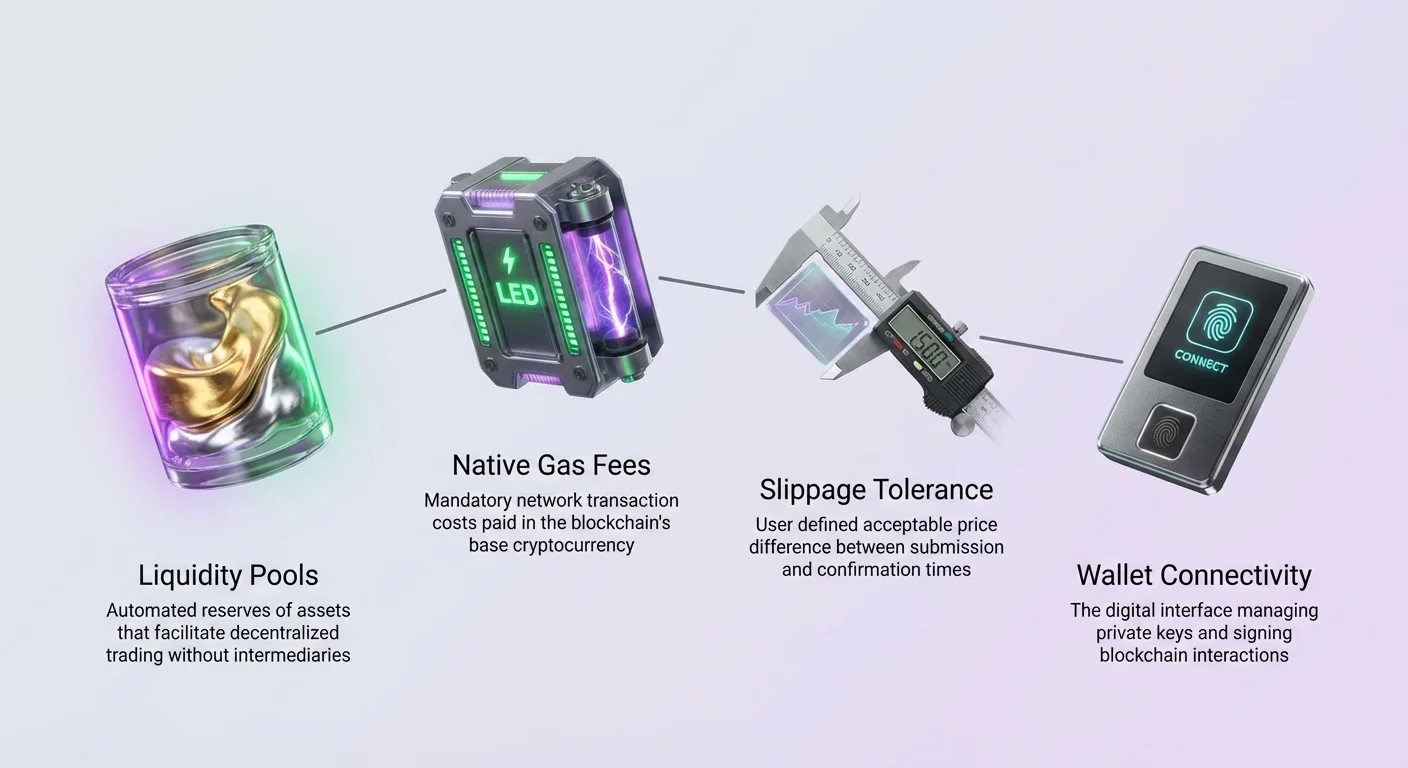
When a transaction fails or a wallet throws an cryptic error, the burden of resolution falls squarely on the individual. Understanding the mechanics behind these errors is the first step toward resolving them. Most issues stem from a few fundamental components of the blockchain infrastructure: liquidity pools, slippage settings, gas fees, and wallet connectivity.
Navigating these technical hurdles requires a solid grasp of how decentralized exchanges (DEXs) and NFT marketplaces function. When you initiate a swap or a purchase, you are interacting directly with a smart contract. If the parameters of your request do not match the current state of the network or the liquidity pool, the protocol will reject the transaction to protect your funds or the integrity of the pool.
This guide explores the common points of failure in DeFi transactions and provides detailed explanations of the underlying mechanisms. By understanding what is happening under the hood—from the automated market maker algorithms to the nuances of blockchain congestion—you can troubleshoot errors effectively. The goal is to move from confusion to confidence, ensuring that your interactions with the decentralized web are as smooth as possible.
Understanding the Mechanics of Decentralized Swaps
To troubleshoot a failed swap, one must first understand what a swap actually is. Decentralized exchanges, or DEXs, facilitate the exchange of cryptoassets without a central authority. They do not rely on order books managed by a company. Instead, they utilize Automated Market Makers (AMMs) and liquidity pools.
A swap is not a direct trade between two individuals in real-time. It is an interaction with a liquidity pool. A pool contains funds for a specific trading pair, such as a governance token and Ethereum (ETH). When you swap, you are depositing one asset into the pool and withdrawing the other based on a mathematical formula.
Failures often occur when the state of this pool changes rapidly. Since anyone can add liquidity or execute trades, the ratio of assets in the pool is in constant flux. If the pool does not have enough of the asset you are trying to buy, or if the price shifts drastically during your transaction attempt, the smart contract may revert the action.
The Role of Liquidity in Transaction Success
Liquidity is arguably the most critical metric for the health of a market. In the context of a DEX, liquidity measures how easily two assets can be exchanged without causing dramatic shifts in the price of either asset. High liquidity means large trades can happen with minimal price impact. Low liquidity means even small trades can skew prices.
Imagine a scenario where a trading pair has very low depth. If you attempt to swap a significant amount of value, you might drain a large percentage of the available tokens in that specific pool. The mechanism governing the DEX will calculate a price that is extremely unfavorable compared to the market rate.
Most modern DEX interfaces have safety checks. If the trade would result in a massive loss of value due to price impact, the interface might prevent the transaction from being submitted. If it is submitted, the blockchain validators might reject it if it violates the parameters set by the slippage tolerance.
Analyzing Pool Health Through Analytics
Before initiating a trade that might fail, it is wise to consult DEX analytics. Advanced platforms provide dashboards that show total liquidity, volume, and fee generation for specific pairs. These analytics are often accessible through the exchange’s interface, sometimes hidden behind a menu icon (often represented by three dots).
By reviewing the "Analytics" section, you can verify if a pair has sufficient liquidity to support your trade. If you see a pair with very low trading volume or meager total value locked, the risk of a failed transaction or high price impact increases significantly.
Furthermore, analytics allow you to see the breakdown of liquidity. You can view top tokens and pairs to confirm you are interacting with the correct, high-volume pools rather than low-liquidity imitations. Checking these statistics acts as a preventative troubleshooting step, saving you from paying gas fees for transactions destined to fail.
Gas Fees and Native Currency Errors
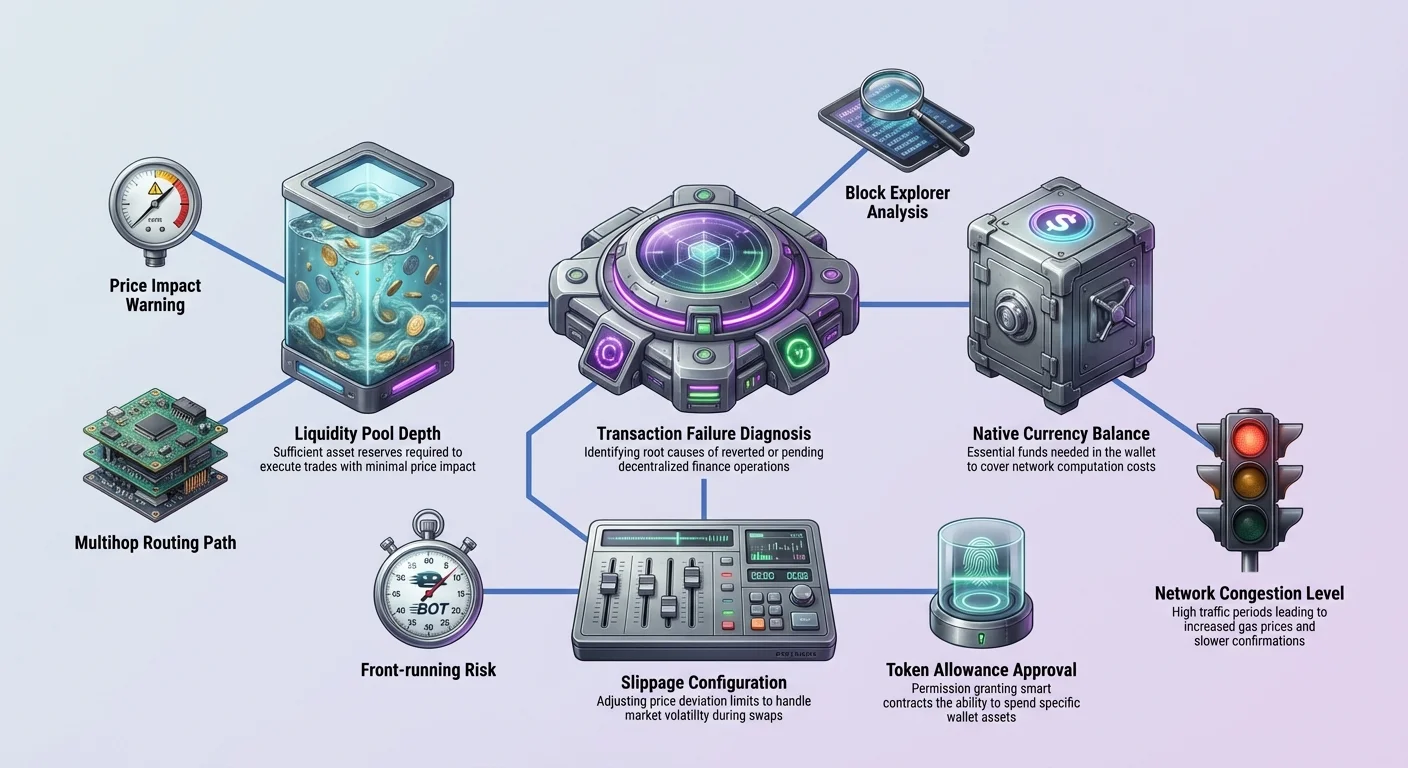
A pervasive source of confusion for new DeFi users involves transaction fees. Every action that changes the state of a blockchain requires a fee. This includes swapping tokens, bidding on NFTs, staking assets, or even approving a protocol to spend your funds.
Crucially, these fees must be paid in the blockchain's native currency. This is a hard rule of the underlying infrastructure. For example, if you are using the Ethereum blockchain, fees are paid in ETH. If you are on the Polygon network, they are paid in MATIC. If you are using the Bitcoin network, they are paid in BTC.
A common error occurs when a user wants to swap a token (like USDT) for another asset. They might have thousands of dollars worth of USDT in their wallet but zero ETH. When they attempt to execute the swap, the button remains greyed out, or the wallet throws an "insufficient funds" error.
Differentiating Between Asset Balance and Gas Balance
The error "insufficient funds" is often misinterpreted. Users look at their token balance, see that they have enough to cover the trade amount, and assume the error is a glitch. However, the wallet is usually referring to the gas balance, not the trade balance.
To fix this, you must ensure your wallet always holds a small amount of the network's native cryptocurrency. You cannot pay for the gas with the token you are trading. The blockchain miners or validators who process the transaction only accept the native asset.
This requirement applies to every step of the process. Even "free" actions like enabling a token for trading for the first time require a gas fee. If your transaction is failing immediately or if your wallet refuses to prompt you for a signature, check your native currency balance first.
Estimating Gas Costs During Congestion
Transaction fees are not fixed; they fluctuate based on network demand. When many people are using the blockchain simultaneously, the cost to include a transaction in the next block increases. If you set a gas limit too low during a period of high congestion, your transaction may remain pending for hours or eventually fail.
Wallets typically estimate the required gas automatically. However, during volatile market events, these estimates can be inaccurate. If a transaction fails with an "Out of Gas" error, it means the computational work required to complete the swap exceeded the limit you set or paid for.
To troubleshoot this, you may need to manually increase the gas limit or wait for network activity to subside. It is important to note that even failed transactions cost gas. The network still performed the work to attempt the transaction, so the fee is deducted from your balance regardless of the outcome.
Slippage Tolerance and Price Volatility
Slippage is a fundamental concept in DeFi trading that leads to many failed transactions. Slippage refers to the difference in price between when an order is placed and when it is confirmed on the blockchain. In the volatile crypto market, prices can change in the seconds it takes for a block to be mined.
When you submit a swap, you are essentially saying, "I want to trade X for Y, but I am willing to accept slightly less Y if the price changes." This buffer is your slippage tolerance. If the price changes more than your tolerance allows, the transaction will fail to prevent you from getting a bad deal.
Configuring Slippage Settings
Most DEX interfaces allow users to customize their slippage tolerance. Common settings range from 0.1% to 1%. In stable markets with high liquidity, a low tolerance is sufficient. However, for volatile assets or low-liquidity pools, the price can swing wildly.
If your transaction constantly fails with errors like "Execution Reverted" or "Slippage Error," your tolerance might be too tight. The market price is moving outside your acceptable range before the transaction processes.
To fix this, you can increase the slippage tolerance in the settings menu of the DEX. For example, changing it from 0.5% to 1% or 2%. However, this is a double-edged sword. Increasing the tolerance means you agree to receive fewer tokens if the price moves against you.
The Dangers of High Slippage
While increasing slippage can force a transaction through, it is not advisable to set it arbitrarily high. A setting of 10% or 20% exposes you to "front-running" bots. These automated programs can see your pending transaction, buy the asset before you to drive the price up, and then sell it to you at the inflated price.
For example, if 1 ETH is quoted at 1500 USDC and you set a 10% slippage tolerance, you are telling the protocol you are willing to pay up to 1650 USDC. If a bot exploits this, you lose 150 USDC instantly.
The troubleshooting balance lies in setting the slippage just high enough to accommodate natural market volatility but low enough to prevent exploitation. Analytics regarding the specific trading pair's volatility can help inform this decision.
Navigating Exchange Paths and Routes
DeFi protocols are designed to find the most efficient way to swap assets. This is known as the exchange path or route. There isn't always a direct liquidity pool for every pair of tokens. If you want to trade Token A for Token B, but no direct A-B pool exists, the DEX must find an alternative.
The DEX might route the trade through an intermediary token. For instance, it might swap Token A for ETH, and then swap that ETH for Token B. This is called a multihop swap. While this happens automatically in the background, it introduces complexity to the transaction.
Route Availability and Complexity
Errors can arise if the DEX cannot find a viable path with sufficient liquidity. This often happens when trading obscure or newly launched tokens. If the algorithm cannot construct a route that satisfies your slippage and price requirements, the "Swap" button may remain disabled, or the transaction may fail during estimation.
If you encounter this issue, check the "Swap Details" or similar section on the exchange interface. It usually displays the path (e.g., ETH -> VERSE -> SHIB). If the route looks excessively long or complex, the failure risk increases because each "hop" costs more gas and is subject to its own price volatility.
Manual Routing Solutions
In some cases, manually breaking up the transaction can solve the problem. Instead of relying on the DEX to route A -> B -> C, you can perform two separate swaps: A -> B, and then B -> C.
This requires two separate transaction fees but gives you more control over each step. It allows you to verify liquidity for each leg of the journey independently. This method is particularly useful when trading assets with low liquidity where the automated router struggles to find a price that falls within acceptable slippage limits.
Troubleshooting NFT Marketplace Errors
Buying and selling Non-Fungible Tokens (NFTs) introduces a different set of potential errors compared to standard token swaps. NFT Marketplaces operate on similar decentralized principles but use different mechanisms like auctions and fixed-price listings.
The main method to buy an NFT is through a marketplace connection with your web3 wallet. Failures here often relate to the specific status of the NFT listing (auction vs. instant buy) or the specific currency required for the purchase.
Auction and Bidding Failures
In an auction system, placing a bid involves signing a transaction that commits your funds or approves the marketplace to move them. A common error occurs when a user tries to bid on an NFT but the transaction fails.
This can happen if the auction has technically ended but the interface hasn't updated. It can also happen in "English auctions" if a higher bid hit the blockchain block before yours. Unlike a queue in a store, blockchain transactions are ordered by gas fees. If someone pays more gas, their bid might be processed first, invalidating yours.
Additionally, verify the minimum bid increment. Smart contracts often require new bids to be a certain percentage higher than the current bid. If you try to bid 1.01 ETH when the current bid is 1.00 ETH, but the increment requirement is 5%, your 1% increase will cause the transaction to fail.
Currency Mismatches in Multichain Markets
Modern NFT marketplaces often support multiple blockchains, such as Ethereum and Polygon. This creates scenarios where a user sees an NFT priced in "ETH" but fails to realize it is "ETH on Polygon" rather than "ETH on Ethereum Mainnet."
Although the ticker symbol might look the same, the assets exist on completely different networks. If you try to buy a Polygon NFT using Mainnet Ethereum, the transaction cannot occur. You would first need to bridge your assets to the correct chain.
Always check the network icon displayed near the NFT's price. Reputable marketplaces usually indicate the chain clearly. If your wallet is connected to the wrong network, the marketplace might prompt you to switch. If you ignore this or force a transaction, it will likely result in an error or lost gas fees.
| Feature | Ethereum Mainnet | Layer 2 / Sidechain |
|---|---|---|
| Gas Fees | Typically Higher | Typically Lower |
| Confirmation Time | Slower | Faster |
| Currency Format | Native ETH | Wrapped or Bridged ETH |
Authenticity and Badges
Another aspect of troubleshooting involves verifying you are buying the correct item. The decentralized nature of these platforms means anyone can upload an image and mint it as an NFT. Scammers often create fake collections that look identical to popular projects.
Marketplaces use "badges" (often checkmarks) to signal that a creator or collection has been vetted. If you attempt to buy an NFT and the transaction seems suspicious or the contract interaction looks unusual in your wallet, pause. Check for the verification badge.
Buying a fake NFT isn't technically a "transaction error" in the code sense, but it is a user error that results in total loss of funds. Always verify the "properties" or "traits" tab of the NFT. Legitimate collections usually have specific properties ranked by rarity. Fake collections often leave these blank or copy them incorrectly.
Wallet Connection and Permissions
The gateway to any DeFi interaction is the digital wallet. Whether it is a self-custodial mobile app or a browser extension, the wallet manages your keys and signs your transactions. Many reported "errors" are simply communication breakdowns between the website (DApp) and the wallet.
Self-custody means you have full control, but it also means the wallet does not automatically know about every token in existence. You must often tell the wallet what to look for.
Permissions and Allowances
Before a DEX can swap your tokens, it needs permission to access them. This is done via an "Approve" transaction. This is a security feature. The smart contract cannot simply take your tokens; you must first sign a transaction that says, "Contract X is allowed to spend Y amount of my Token Z."
A common troubleshooting scenario involves a user trying to swap, but the button does nothing. This usually means the "Approve" step was skipped or is still pending. You generally only need to approve a specific token for a specific DEX once.
If a swap fails repeatedly, it might be an issue with an old allowance. In advanced troubleshooting, you might need to revoke old permissions and re-approve the token. This resets the relationship between your wallet and the protocol, clearing out any stuck states.
Visibility of Assets
After a successful swap or NFT purchase, users often panic because they cannot see the new asset in their wallet. They assume the transaction failed. In reality, the transaction likely succeeded, but the wallet interface hasn't been updated to display the new token.
Wallets maintain a list of standard tokens. If you swap for a new or niche token, the wallet might not display it automatically. To fix this, you need to manually import the token address. This address can be found on blockchain explorers.
The same logic applies to NFTs. You might need to navigate to a specific "NFT" tab in your wallet or refresh the metadata. In some cases, viewing your profile on the marketplace itself is a better way to confirm ownership than looking at the wallet's simplified UI.
Analyzing Failed Transactions via Block Explorers
When a transaction fails, the wallet usually provides a brief, generic error message like "Transaction Failed." This is rarely helpful for diagnosing the root cause. To truly troubleshoot, you must look at the transaction on a block explorer.
Block explorers are public ledgers that record every action on the blockchain. By clicking the transaction hash (ID) provided by your wallet, you can see the specific details of the attempt.
Reading Error Codes
On the explorer page, a failed transaction will typically have a red exclamation mark or "Reverted" status. More importantly, it often lists the specific reason for the reversion.
Common on-chain error messages include "Slippage Limit Exceeded," "Insufficient Liquidity," or "Transfer Helper: Transfer From Failed." These technical messages pinpoint the exact step in the smart contract logic that broke.
For example, "Transfer From Failed" often suggests the token approval was not set correctly, or you do not actually hold the tokens you are trying to sell. "K" or invariant errors usually point to AMM math failures caused by extreme volatility or low liquidity.
Assessing Network Status
Sometimes the issue is not with your transaction but with the network itself. If transactions are pending for hours, the network might be congested. Block explorers show the current average gas price.
If you submitted a transaction with a gas price of 20 Gwei, but the current network average is 50 Gwei, your transaction will be ignored by miners until the congestion clears. You can troubleshoot this by "speeding up" the transaction—essentially replacing the old request with a new one that includes a higher fee.
Best Practices for Prevention
Troubleshooting is necessary when things go wrong, but prevention is better. Establishing a routine of checks before confirming any transaction can eliminate the vast majority of errors.
Start by checking the liquidity of the pair you intend to trade. Use the analytics dashboards provided by the DEX. Look for healthy volume and deep pools. If a pool has very little capital, consider if the trade is worth the risk of high slippage.
Always double-check your slippage tolerance. Reset it to a standard level (like 0.5% or 1%) after trading volatile assets. Leaving it at a high percentage by mistake is a security risk.
Finally, maintain a buffer of native currency. Never swap your entire stack of ETH or SOL. Always leave a fraction behind to pay for future gas fees. This simple habit prevents the "stranded wallet" scenario where you have assets but no way to move them.
Conclusion
Troubleshooting in the world of Decentralized Finance requires a shift in mindset. Without a central support team to rely on, the user must understand the interplay between wallets, smart contracts, and blockchain networks. Errors are rarely random; they are logical outcomes of specific conditions—whether that be insufficient gas, excessive price volatility, or a lack of liquidity in a pool. By identifying the root cause, users can take specific actions to resolve the issue, such as adjusting slippage tolerance or topping up native currency balances.
Success in DeFi is built on this technical literacy. Recognizing the difference between a wallet display error and a failed blockchain transaction saves time and prevents panic. Using analytics tools to assess market health before trading acts as a vital safeguard. As the ecosystem continues to evolve, the mechanisms may become more complex, but the fundamental principles of gas, liquidity, and self-custody will remain the pillars of the decentralized economy.
True control over your financial assets means accepting the responsibility to learn how the system works and how to fix it when it doesn't.