
Welcome to the digital frontier of finance. As you embark on the path toward self-sovereignty in the crypto space, understanding where your assets are vulnerable is the first step toward security.
A hot wallet is any cryptocurrency wallet that is connected to the internet. This includes the app on your phone, the software on your desktop, and crucially, the account you hold on a centralized crypto exchange. Their defining feature is convenience—they allow for instant transactions anytime, anywhere. However, this constant connectivity is also their greatest weakness, exposing your digital assets to a myriad of online threats, including hacking, phishing, and malware.
This guide provides a comprehensive framework—the Hot Wallet Risk Matrix—to help you systematically assess the inherent security risks associated with internet-connected wallets. We move beyond generic warnings to provide actionable mitigation tactics. By understanding the specific vectors of attack, you can adopt advanced security practices to protect your funds, ensuring that your convenience does not come at the cost of your financial security.
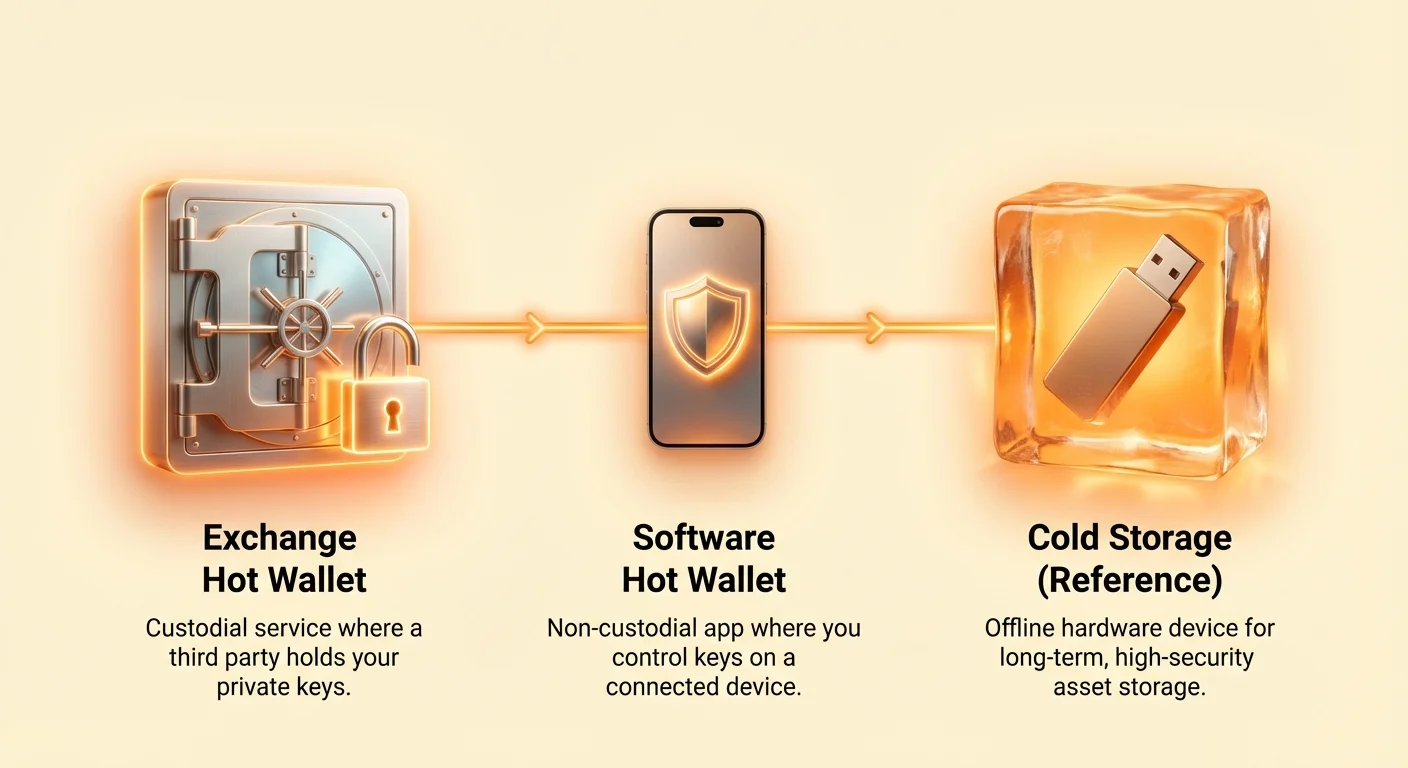
Understanding the Hot Wallet Spectrum
Hot wallets exist on a continuum of risk, primarily defined by who controls the private keys—the secret cryptographic codes that grant access to your funds. The fundamental principle of hot wallet security is simple: the more control you have over the keys, the more responsibility (and complexity) falls on you to protect them.
Exchange (Custodial) Hot Wallets: Highest Risk, Highest Convenience
When you leave cryptocurrency on a centralized exchange (like Coinbase or Binance), you are using the exchange’s "hot wallet." This is known as a custodial wallet because the exchange holds the private keys for you.
- Risk Profile: You are protected from individual threats like malware on your personal device, but you inherit the entire security risk of the exchange itself. If the exchange is hacked, suffers internal fraud, or faces regulatory insolvency, your funds are at risk. This is known as counterparty risk.
- Use Case: Ideal only for small amounts needed for immediate trading or conversion. Never store long-term wealth here.
Software (Non-Custodial) Hot Wallets: Medium Risk, Self-Sovereignty
A software wallet, whether mobile (like the Bitcoin.com Wallet or MetaMask) or desktop, is a non-custodial wallet. You download the software and you, and only you, hold the private keys (usually represented by a 12- or 24-word seed phrase).
- Risk Profile: While you eliminate counterparty risk, you are now fully responsible for the security of your device and operating environment. Your funds are only as safe as the device you use. Threats include computer malware, keyloggers, and app-level phishing attempts.
- Use Case: Excellent for active participation in decentralized finance (DeFi), interacting with NFTs, or daily transactions where speed and connectivity are essential.
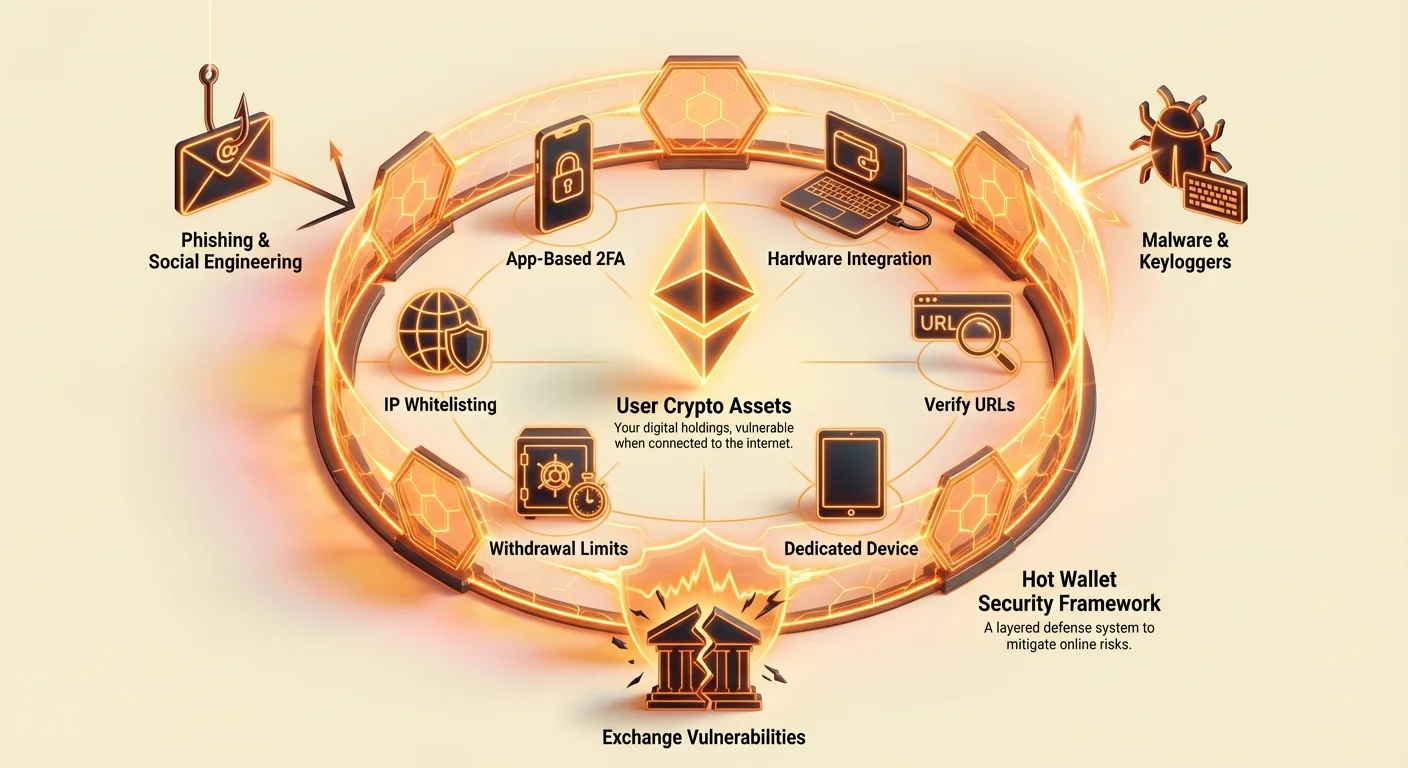
Defense Strategy 1: Mitigating Phishing and Social Engineering
The most common vector for losing funds via a hot wallet is not technical hacking, but human manipulation, or "social engineering." Phishing attacks are designed to trick you into revealing your private keys or approving a malicious transaction.
Identifying Imposter Sites and Apps (The "Verify Everything" Rule)
Scammers often create near-perfect clones of legitimate websites (exchanges, wallet providers, DeFi platforms) to capture your login credentials or seed phrase.
Actionable Mitigation:
- Manual URL Entry: Never click on links in emails, text messages, or unverified social media posts when accessing a crypto service. Always manually type the official, verified URL into your browser.
- Bookmark Critical Sites: Use your browser's bookmark function for every crypto platform you use. Only access the site via the bookmark.
- Check the Connection (SSL/TLS): Ensure the website address begins with
https://and look for the padlock icon. While this doesn't guarantee the site is legitimate, its absence is an immediate red flag. For critical sites, check the security certificate details to ensure the site owner matches the company name. - App Verification: When downloading mobile or desktop wallets, verify the developer name, look for millions of downloads, and cross-reference the app store link against the official website of the wallet provider.
Securing Communication Channels (Email, SMS, and Discord Scams)
Scammers frequently use email, text messages, and chat platforms like Telegram or Discord to create a sense of urgency, often claiming your account is compromised or that you are eligible for a free airdrop.
Actionable Mitigation:
- Assume Scrutiny: No legitimate crypto service will ever ask for your private key, seed phrase, or password via email or chat. Any message demanding this information is a scam.
- Dedicated Crypto Email: Use a unique, strong email address secured with 2FA solely for crypto-related services. This minimizes the risk of credentials being exposed in general data breaches.
- Disable Direct Messaging (DMs): On platforms like Discord, where community support is often sought, turn off Direct Messages from non-friends. Scammer accounts frequently masquerade as admins or support staff.
- Out-of-Band Verification: If you receive an urgent security alert via email, do not click the link. Close the email, open a new browser tab, and navigate to the service's official website manually to check your account status.
Implementing Two-Factor Authentication (2FA) Properly
2FA is critical, but not all methods are created equal. It ensures that even if an attacker steals your password, they cannot log in without the second factor.
Actionable Mitigation:
- Prioritize App-Based 2FA: Use hardware-based or authenticator applications (like Google Authenticator or Authy) over SMS 2FA. SMS messages can be intercepted through SIM-swapping attacks (where a scammer convinces your phone provider to transfer your phone number to their device).
- Secure Your Recovery Keys: When setting up a 2FA app, save the backup codes (usually a QR code or seed) offline. If you lose your phone, these codes are the only way to recover access. Treat these keys with the same care as your wallet seed phrase.
- Enable Withdrawal Whitelisting: On exchanges, enable features that require you to verify new withdrawal addresses via email or, ideally, require a time delay (e.g., 24 hours) after adding a new withdrawal address.
Defense Strategy 2: Blocking Malware and Keyloggers
Malware—malicious software—is designed to compromise your device and covertly steal information. For hot wallet users, the key risks come from software that records keystrokes (keyloggers) or modifies data on the fly.
Isolating Crypto Activity (The Dedicated Device Strategy)
The highest level of operational security for hot wallets involves using a dedicated device—a laptop or phone—that is solely used for crypto transactions and nothing else.
Actionable Mitigation:
- Air-Gapped Browsing: If you cannot afford a dedicated device, commit to using a specific browser profile (or even a completely separate operating system like Linux) just for crypto interactions.
- No Unverified Downloads: Never use your crypto device or profile to download or install games, torrents, email attachments, or cracked software. These are common sources of keyloggers and spyware.
- Regular Wipes and Updates: Ensure your operating system (Windows, macOS, iOS, Android) is always updated to patch known vulnerabilities. Regularly back up and clean your device to remove accumulated digital clutter that might harbor malware.
Protecting Your Seed Phrase During Setup
Your seed phrase is the master key to your non-custodial wallet. If a keylogger or screen-capture tool is running on your device, entering your seed phrase digitally is a massive risk.
Actionable Mitigation:
- Never Type, Always Write: When initializing a new non-custodial software wallet, never enter the seed phrase on a device that is, or has been, connected to the internet. If the wallet requires you to enter the seed for verification, write it down first, then use an on-screen keyboard (if available) or copy/paste characters one by one to avoid keystroke logging.
- Use Hardware Wallet Integration: The single best way to use a software wallet securely is to link it to a hardware wallet (cold storage). For example, you can use the MetaMask interface, but the actual private key remains locked on the hardware device, requiring a physical confirmation for every transaction. This effectively turns a hot wallet interface into a cold storage tool.
Understanding Clipboard Hijacking and Screen Capture Threats
Beyond keyloggers, two subtle malware risks target the efficiency of the modern user:
- Clipboard Hijacking: This sophisticated malware monitors your clipboard for cryptocurrency addresses. When you copy your recipient's address and paste it into the wallet's send field, the malware instantly swaps the legitimate address with the attacker's address.
- Mitigation: Always verify the first four and last four characters of the recipient address after pasting it.
- Screen Capture and Overlay Attacks: Some malware takes screenshots or creates invisible overlays over your wallet interface, capturing sensitive information or tricking you into clicking a malicious button.
- Mitigation: Use strong, verified anti-malware software. When conducting high-value transactions, consider restarting your device into "safe mode" or a verified fresh boot to ensure no background processes are running.
Specializirana tveganja: Ranljivosti vročih denarnic izmenjav
Medtem ko programske denarnice nosijo tveganje naprave, vroče denarnice izmenjav nosijo skrbniško tveganje. Tudi z popolno osebno varnostjo ste izpostavljeni tveganjem, ki jih nosi centralizirana entiteta, ki hrani vaša sredstva.
Tveganje protistranke centraliziranih izmenjav (CZ)
Ko uporabljate CZ, jim zaupate integriteto, solventnost in varnost sredstev. Zgodovina je polna primerov večjih izmenjav, ki so propadle zaradi slabega notranjega nadzora, insolventnosti ali množičnih zunanjih vdorov.
Praktično omajevanje:
- Nastavite omejitve izplačil: Nastavite svoj račun izmenjave tako, da uvede največje dnevne ali tedenske omejitve izplačil. Če napadalec pridobi dostop, to omeji škodo, ki jo lahko povzroči v kratkem času.
- Raziskave varnostne zgodovine: Pred depoziti raziščite zgodovino izmenjave. Objavljajo dokaz o rezervah? Uporabljajo zunanje revizijske firme? Ponujajo zavarovalni sklad za uporabniška sredstva?
- Ne uporabljajte izmenjav kot bank: Temeljno načelo omajevanja tveganja izmenjave je minimiziranje izpostavljenosti. Na izmenjavi hranite le znesek kripta, potreben za takojšnjo trgovalno aktivnost. Vsa dolgoročna sredstva prenesti v rešitev hladne shrambe.
Varovanje računa pred nepooblaščenim dostopom
Čeprav izmenjava obravnava zasebne ključe, še vedno potrebujete robustno zaščito za svoj prijavni portal.
Praktično omajevanje:
- Omogočite beleženje IP: Mnoge večje izmenjave omogočajo beleženje specifičnih IP naslovov (vaše domače ali pisarniško omrežje). Če nekdo poskuša dostopati ali izplačati sredstva s tujega IP naslova, je poskus samodejno blokiran ali močno zamaknjen.
- Močna, edinstvena gesla: Uporabite upravljalnik gesel za generiranje izjemno kompleksnega, edinstvenega gesla za vaš račun izmenjave – takega, ki ga ne uporabljate nikjer drugje.
- Pazite na lažne prijave: Bodite previdni glede legitimnosti prijavne strani. Prevaranti pogosto uporabljajo domene z napakami (npr. binanace.com namesto binance.com), da ukradejo poverilnice.
Ključno pravilo: Minimizirajte sredstva na izmenjavah
V kontekstu Matrike tveganj vroče denarnice predstavljajo centralizirane vroče denarnice izmenjav kategorijo z najvišjim prirojenim tveganjem zaradi pomanjkanja osebnega nadzora nad ključi.
Če sredstva ni aktivno potrebno za trgovanje ali takojšnjo nakup, ga je treba umakniti na neskrbniško denarnico (po možnosti strojno denarnico). To popolnoma odpravi tveganje protistranke. Izmenjavo si predstavljajte kot bančno lobijo – tam izvedete transakcije, vendar tam ne spite.
Ongoing Operational Security: Vetting Software and Updates
Software wallets, whether desktop or mobile, require periodic updates to fix bugs, add features, and patch security flaws. However, malicious updates can also be a delivery mechanism for attackers.
Source Verification for Wallet Downloads (Official Channels Only)
Never trust a third-party source for your wallet software. If a malicious actor compromises a third-party download site, they can deliver poisoned software that looks identical to the real wallet.
Actionable Mitigation:
- Always Use Official Websites: Download links should only be accessed directly from the wallet provider's official website.
- GPG/Signature Checks: For advanced desktop users, many open-source wallets provide cryptographic signatures (GPG keys) that allow you to mathematically verify that the downloaded file has not been tampered with since the developers released it. Learn how to verify these signatures before installation.
- Check Social Media and Forums: When a major wallet update is released, check community forums (like Reddit or Twitter) for confirmation from other users before applying the update immediately. This crowdsourced vetting helps catch potential zero-day exploits or malicious releases early.
The Danger of Software Bloat and Excessive Permissions
Every application you install on your device introduces potential entry points for attackers. Software bloat—wallets that bundle unnecessary features—increases the attack surface.
Actionable Mitigation:
- Minimize Permissions: When installing mobile wallets, review the permissions requested. Does a simple Bitcoin wallet really need access to your camera, microphone, or full contact list? Deny any permissions that are not strictly necessary for the wallet's core function.
- Avoid Browser Extensions (Where Possible): Browser extensions are highly effective phishing vectors. Unless the extension is absolutely necessary (like MetaMask for specific DeFi interaction), avoid installing wallet software as a browser plugin, as this gives the application deep access to your browsing activity.
- Regular Audits: Regularly review the apps installed on your device. Delete any unused or suspicious software, especially those that were downloaded years ago and haven't been updated.
Zaključek
Vroče denarnice so bistvena orodja za interakcijo z dinamičnim svetom kriptovalut. Zagotavljajo potrebno hitrost in udobnost za trgovanje, delovanje s pametnimi pogodbami ter vsakodnevno porabo. Vendar pa ta udobnost prinaša povečano varnostno breme.
Matrica tveganj vročih denarnic zahteva, da spremenite svojo miselnost iz pasivnega zanašanja na varnost v aktivno, namerno obrambo. Z razumevanjem vektorjev – ribarjenje, zlonamerna programska oprema in tveganja menjalnic – ter uporabo izvedljivih strategij omilitve, podrobno opisanih zgoraj, lahko drastično zmanjšate verjetnost izgube. Spomnite se zlatega pravila kripto varnosti: hranite tisto, kar potrebujete za vsakodnevno uporabo, v vroči denarnici in zavarujte večji del svojega bogastva v hladnem shranjevanju. Obvladovanje varnosti vročih denarnic je ključni most med učenjem osnov in doseganjem prave samo-suverenosti.