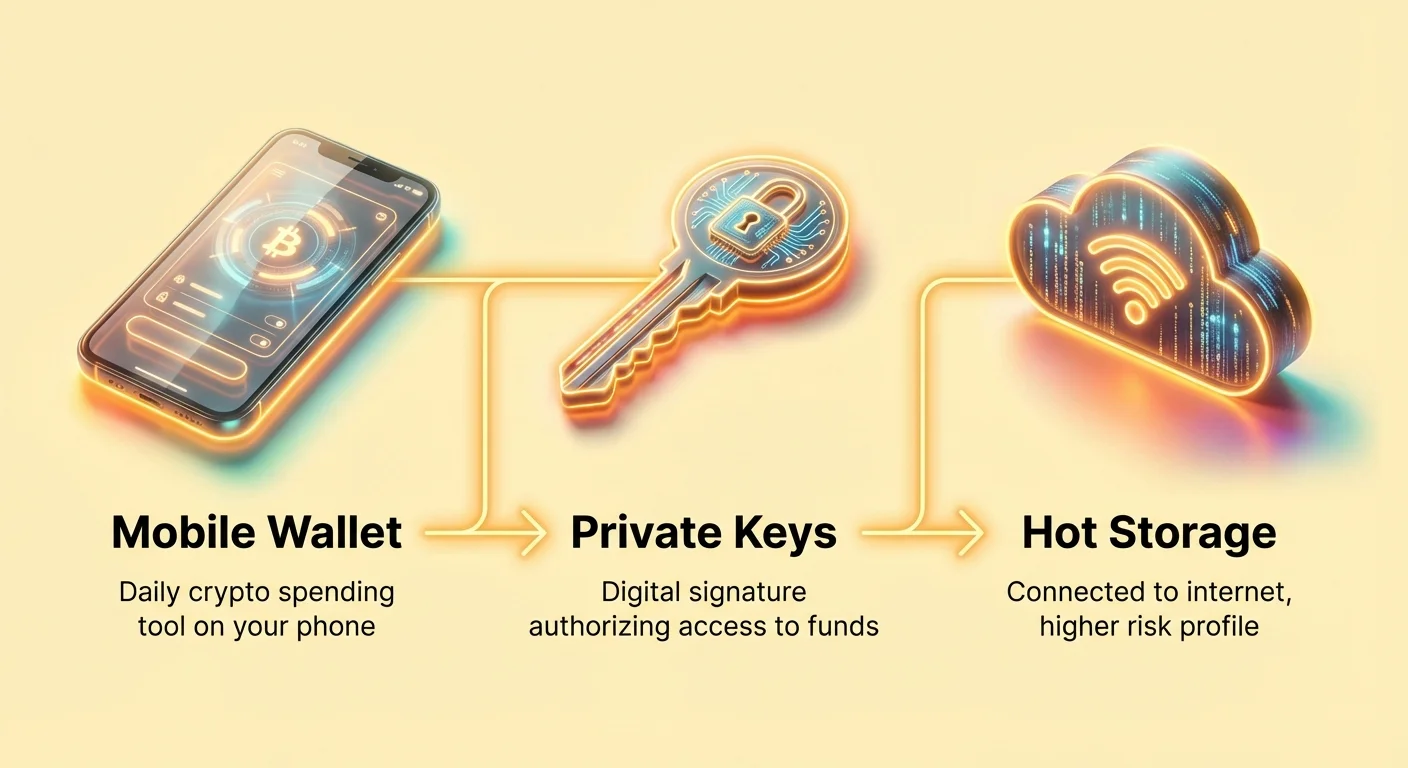
When you first enter the world of cryptocurrency, the concept of a "wallet" can be confusing. Unlike a traditional leather wallet that holds physical cash, a crypto wallet doesn't actually store your coins. Instead, it stores the highly complex digital keys that allow you to access and spend your crypto assets on the decentralized blockchain network.
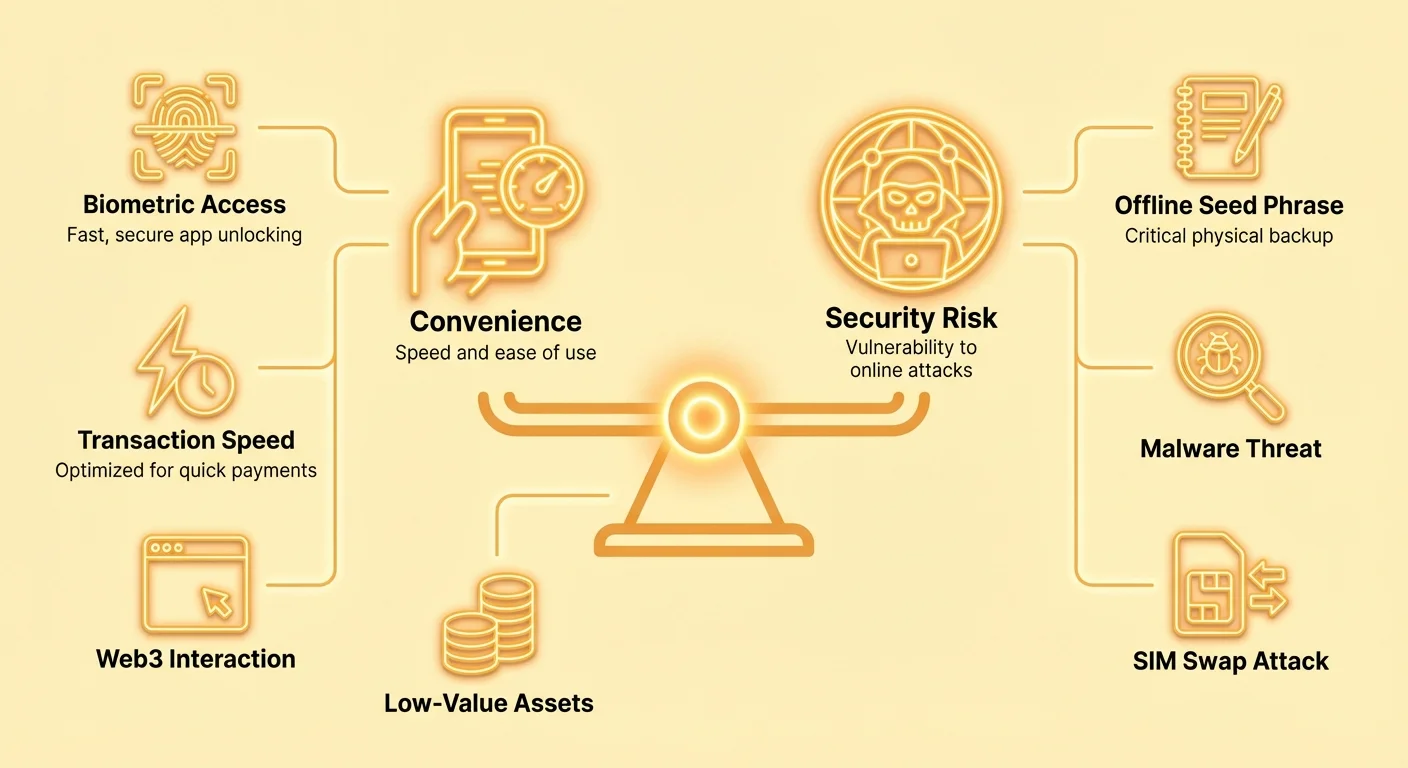
Mobile wallets—apps installed directly on your smartphone—represent the most common entry point for new users and the preferred choice for daily activity. They offer unparalleled convenience, allowing you to check balances, send funds, or interact with decentralized applications (DApps) anytime, anywhere. However, this convenience comes with a necessary trade-off: security.
Because your mobile device is constantly connected to the internet, a mobile wallet is considered "hot storage." This means it is inherently more vulnerable to online threats, hacking, and device-specific attacks than offline "cold storage" hardware devices. Therefore, choosing the right mobile wallet is less about finding the one with the most features, and more about finding the perfect balance between high usability and robust operational security for the specific demands of frequent, low-value transactions.
The Mobile Wallet Advantage: Speed and Convenience
Mobile wallets are designed for action. They are the equivalent of carrying a small amount of spending money in your physical wallet—enough for daily needs, but not your life savings. Their primary appeal lies in their speed, user interface (UX), and seamless integration into modern life.
The 'Hot Wallet' Distinction
A mobile wallet falls under the category of a "hot wallet" because the device holding your private keys is always online. This is the core factor driving its utility and risk profile.
Key Characteristics of a Hot Wallet:
- Instant Accessibility: You can authorize transactions within seconds, which is crucial for purchasing goods, tipping, or reacting quickly to market movements.
- Web3 Interaction: Many modern mobile wallets, such as MetaMask or Phantom, include built-in browser capabilities, allowing you to connect directly to DeFi protocols (decentralized finance) and NFT marketplaces without needing a laptop.
- Low Barrier to Entry: Setting up a mobile wallet often takes only minutes and requires no special hardware, making it the fastest way for a beginner to get started.
For high-value assets intended for long-term holding (savings), a hardware wallet is the standard recommendation. But for the small amounts of crypto needed to pay gas fees or make daily purchases, mobile wallets are irreplaceable.
User Experience (UX) and Instant Sync
Mobile wallets are successful because they hide the complexity of the blockchain behind a clean, intuitive interface. They simplify steps like calculating network fees and address management.
Crucially, mobile wallets use a process called Simplified Payment Verification (SPV) or rely on centralized servers maintained by the wallet developer to function. This allows the wallet to "instantly sync" with the blockchain without downloading the hundreds of gigabytes of data that a full node would require.
- The UX Benefit: When you open the app, your balance updates immediately. There is no waiting time, which is essential for a mobile application.
- The Hidden Trade-off: Relying on SPV means your wallet trusts the servers it connects to for accurate transaction history. While highly practical, this introduces a slight element of centralization compared to running your own full node, which verifies every transaction independently. For most daily transactions, this trust trade-off is acceptable for the sake of speed.
Transaction Speed and Network Fees
Mobile wallets often optimize for transaction speed by allowing users to easily adjust their network fee (known as "gas" on many chains like Ethereum). A higher fee ensures the transaction is prioritized by miners or validators, leading to faster confirmation times.
A good mobile wallet comparison must look beyond just the raw speed of the underlying blockchain (e.g., Solana is fast, Bitcoin is slow) and evaluate:
- Fee Customization: Does the app allow you to easily choose low, medium, or high fees based on current network congestion?
- Network Compatibility: Does the wallet support cheap, fast Layer 2 networks (like Polygon or Arbitrum) which process transactions off the main chain, significantly reducing costs and speed?
- Built-in Swapping: Wallets that offer instant, in-app currency swaps (often using integrated decentralized exchanges or DEXs) reduce the number of steps required, boosting overall operational efficiency.
Security Fundamentals for Daily Use
Because mobile wallets are used for daily operations, they must employ robust defenses against the most common vectors of attack: software vulnerabilities, device loss, and social engineering.
Understanding Private Keys and Seed Phrases (The Core Principle)
All crypto wallets rely on a private key—a secret number that mathematically proves you own your funds. The mobile wallet stores this key securely on your device.
When you first set up the wallet, you are given a Seed Phrase (or recovery phrase), typically 12 or 24 words (like "tree, banana, river, fork..."). This phrase is the master key to all your crypto. If your phone is lost, stolen, or broken, this phrase is the only way to restore your wallet and regain access to your assets on a new device.
The Golden Rule of Mobile Wallet Security: The seed phrase must never be stored digitally on the device, backed up to the cloud, or screenshotted. It must be written down physically and stored offline in a secure, fireproof location, separate from the phone itself.
The Necessity of PINs and Biometrics
For daily security, mobile wallets rely on layered protection designed to stop casual theft or prying eyes. These features lock the app itself, not the cryptographic keys.
- Wallet PIN: A short, numerical code required every time the app is opened or a transaction is signed.
- Biometric Authentication (Face ID/Fingerprint): This feature uses your phone's native security hardware to provide quick, secure access. Biometrics are superior to short PINs because they are nearly impossible for a thief to guess, and they prevent accidental transactions if someone briefly accesses your unlocked phone.
Actionable Tip: Always enable immediate biometric protection for your mobile wallet, even if the phone itself is already password-protected. This creates a necessary second layer of security specifically for your financial assets.
When to Use a Mobile Wallet (Use Case and Value Threshold)
A critical component of secure crypto management is understanding the appropriate use case for each wallet type.
Mobile wallets are best suited for:
- Spending Capital: Funds intended for immediate transactions (paying for coffee, buying an NFT drop, making a quick trade).
- DeFi Interaction: Small amounts used to "stake" or provide liquidity on decentralized applications.
- Low-Risk Holdings: Generally, any amount you would feel comfortable keeping in a checking account or cash in your physical wallet (e.g., 5-10% of your total crypto portfolio).
The Threshold Rule: Treat your mobile wallet balance as "pocket money." If the value of the assets stored in your mobile wallet exceeds an amount that would genuinely hurt you if it were lost instantly, those funds should be moved to secure cold storage (like a hardware wallet).
Analyzing Key Security Trade-offs in Mobile Wallets
Mobile wallet developers constantly struggle to strike a balance between making their product so easy to use that users adopt it quickly, and making it secure enough to withstand professional attacks. Understanding the trade-offs involved in key design decisions is vital for the informed user.
Biometric Security: Convenience vs. Legal Risk
While biometrics (Face ID, Touch ID) offer the best daily convenience, they present a unique, advanced security consideration.
- The Convenience: Biometrics are fast and allow you to sign transactions without typing a long password repeatedly.
- The Risk: In some jurisdictions, legal precedent suggests that an individual can be compelled to unlock a device or application using a biometric identifier (fingerprint or face). It is significantly harder (often legally impossible) to compel someone to reveal a memorized, complex PIN or password.
Advanced Best Practice: For higher-value transactions or sensitive interactions, some users disable biometrics entirely and use a strong, unique, memorized password or PIN. This ensures that you have plausible deniability and absolute control over access, even if your device is physically confiscated.
Seed Phrase vs. Cloud Backup Risks
The recovery of a lost wallet is arguably the highest-risk activity in the crypto space. Two opposing approaches exist for seed phrase storage:
| Storage Method | Security Profile | Convenience | Risk Scenario |
|---|---|---|---|
| Physical/Offline Storage | Highest. Keys are air-gapped from the internet. | Low. Must physically retrieve the phrase if the phone is lost. | Fire, flood, physical misplacement. |
| Cloud Backup (e.g., Encrypted to iCloud/Google Drive) | Moderate. Backups are encrypted but rely on a third-party server. | High. Recovery is fast and easy if you switch phones. | Cloud provider breach, compromised login credentials, or malicious cloud app access. |
Some beginner-focused mobile wallets now offer features that encrypt and store the seed phrase in a user’s iCloud or Google Drive for easy backup. While incredibly convenient, this significantly increases the centralization risk. If your general email account or cloud login is compromised, the attacker gains immediate access to your master key.
Recommendation: Avoid storing your seed phrase digitally, even in encrypted cloud storage. The increased risk of a hack outweighs the slight convenience boost. Treat your seed phrase like the physical title to your house—it should be protected offline.
Full Node Validation vs. Simplified Payment Verification (SPV)
This technical distinction speaks directly to the level of trust you place in the wallet provider:
- Full Node Validation: Downloads and verifies the entire history of the blockchain. This is the gold standard for security and privacy, as it guarantees you are receiving trustless information directly from the decentralized network. (Too slow and data-intensive for mobile.)
- SPV (Simplified Payment Verification): Used by most mobile wallets. The wallet downloads only small portions of block headers and relies on connections to other network nodes (often the wallet developer’s own servers) to confirm a transaction’s validity.
Mobile wallets must use SPV to be fast. The trade-off is that you implicitly trust that the servers you connect to are honest. For daily spending, this level of trust is necessary and generally low-risk. However, for significant, long-term holdings, relying on a full node (often done via a desktop wallet or hardware wallet paired with your own node) remains the most sovereign method.
Operational Security Risks Unique to the Mobile Environment
Mobile phones introduce security complexities that desktop computers and hardware devices do not share. Managing these specific operational risks is the single most important factor in securing your daily use wallet.
Preventing SIM Swap Attacks
A SIM swap attack is one of the most devastating threats to mobile crypto users and exploits the phone carrier, not the crypto wallet itself.
How a SIM Swap Works: An attacker socially engineers your phone carrier (or bribes an employee) to transfer your phone number (and thus your SIM card) onto a device they control. Once they have your phone number, they can intercept all incoming calls and text messages, including critical security codes.
The Danger to Crypto: If an attacker compromises your email or crypto exchange account password, they use the intercepted SMS code (the "Second Factor") to complete the takeover. Even if the wallet itself is self-custodial, SIM swaps often target centralized exchanges or semi-custodial wallets where SMS is used for account recovery.
Defense Strategies:
- Disable SMS 2FA: Never use SMS (text messages) for 2FA on crypto exchanges, email accounts, or any financial services.
- Use Hardware Security Keys (YubiKey): These are physical devices that plug into your phone and provide un-phishable 2FA.
- Use Authenticator Apps (Google Authenticator/Authy): Time-based One-Time Password (TOTP) apps generate codes locally on your device, making them immune to interception via SMS.
- Implement a Porting PIN/Password: Contact your mobile provider and set a special, complex password that must be provided before your number can ever be transferred to a new device.
Managing App Permissions and Malicious Software
Mobile operating systems (iOS and Android) control what level of access an application has to your device (location, camera, contacts, etc.).
The Risk: Malicious wallet apps, or legitimate apps that ask for excessive permissions, can potentially expose sensitive data or intercept clipboard information (like a copied crypto address).
Defense Strategies:
- Download Only from Official Stores: Never install a crypto wallet from a third-party website or an unverified link. Check the developer name, download count, and user reviews carefully.
- Audit Permissions: Regularly review the permissions granted to your crypto apps. A wallet does not need access to your camera (unless scanning a QR code), location, or microphone. Revoke any unnecessary permissions.
- Keep Your OS Updated: Mobile operating system updates frequently patch critical security vulnerabilities that hackers often exploit to gain access to stored application data.
Dealing with Physical Phone Loss or Theft
While hardware wallets are immune to phone theft, mobile wallets face a direct threat if your phone is stolen while unlocked or if the thief can guess the PIN.
Defense Strategies:
- Immediate Screen Lock: Set your phone’s screen lock timer to the absolute minimum (e.g., 30 seconds).
- Remote Wipe Capabilities: Ensure you know how to use your phone's built-in "Find My Device" or similar remote wipe feature (via iCloud or Google) to destroy all data if the device cannot be recovered.
- Use Decoy Apps: If possible, use a separate, less important mobile wallet app as the primary shortcut on your home screen, keeping the app holding your primary spending funds hidden in a folder.
Practical Comparison Framework: Finding Your Best Mobile Wallet
The "best" mobile wallet depends entirely on your activity profile. An NFT collector needs robust Web3 browser functionality, while a user prioritizing privacy might seek wallets with built-in Tor support or enhanced seed management.
Feature Checklist for Beginners
When comparing mobile wallets, a beginner should prioritize the following features that enhance both usability and core security:
| Feature | Security or Convenience Benefit |
|---|---|
| Self-Custody (Non-Custodial) | Security. You hold the private keys (the seed phrase). Essential for sovereignty. |
| Multi-Chain Support | Convenience. Allows you to manage Bitcoin, Ethereum, Solana, etc., all in one app. |
| Built-in Exchange/Swap | Convenience. Allows fast purchasing and exchanging without moving funds to a centralized exchange (CEX). |
| Mandatory Biometrics/PIN | Security. Requires secondary authentication to open the app, protecting against casual theft. |
| NFT Viewing Capability | Convenience. Ability to view, send, and receive digital collectibles directly in the app. |
| Hierarchical Deterministic (HD) | Security. Allows you to create new public addresses for every transaction, enhancing privacy. (Most modern wallets are HD). |
| Open-Source Code | Security. Allows the global developer community to audit the code for bugs and backdoors. |
Key Metrics: Speed, Privacy, and Transaction Costs
When making your final selection, weigh these three critical performance metrics:
1. Transaction Speed
This is often tied to the wallet’s integration with faster networks. Look for wallets that offer built-in support for scaling solutions like the Lightning Network (for Bitcoin) or Layer 2 solutions (for Ethereum/EVM chains). A wallet that only supports the main Bitcoin chain will inherently be slower and more expensive than one that routes transactions through the Lightning Network for small payments.
2. Privacy Features
For users concerned about data exposure, privacy goes beyond security.
- IP Address Masking: Some wallets route traffic through privacy networks (like Tor) or use proprietary servers to prevent third parties from linking your transaction activity to your physical location.
- Address Re-use: Look for wallets that automatically generate new public receiving addresses, making it harder for observers to track all your financial activity.
3. Transaction Costs (Fees)
A quality mobile wallet provides intelligent fee estimation. It should give you an accurate, real-time estimate of the network fee required. Some advanced wallets even allow you to set "custom gas limits" for transactions that are complex or involve interaction with a smart contract. Lower fees generally mean slower confirmation, so a good wallet clearly presents the trade-off.
Conclusion
Mobile crypto wallets are the engine of daily interaction in the digital economy. They offer a powerful blend of accessibility and speed, transforming your smartphone into a key to Web3. However, they demand a proactive and disciplined approach to security.
The core lesson in mobile wallet comparison is recognizing that convenience often comes at a security cost. By implementing robust operational security—like ditching SMS 2FA, treating your mobile wallet as a "spending account," and physically securing your seed phrase—you minimize the inherent risks of hot storage. Choose a wallet that balances intuitive design with transparent security practices, ensuring that your journey toward digital self-sovereignty is secure, fast, and user-friendly.