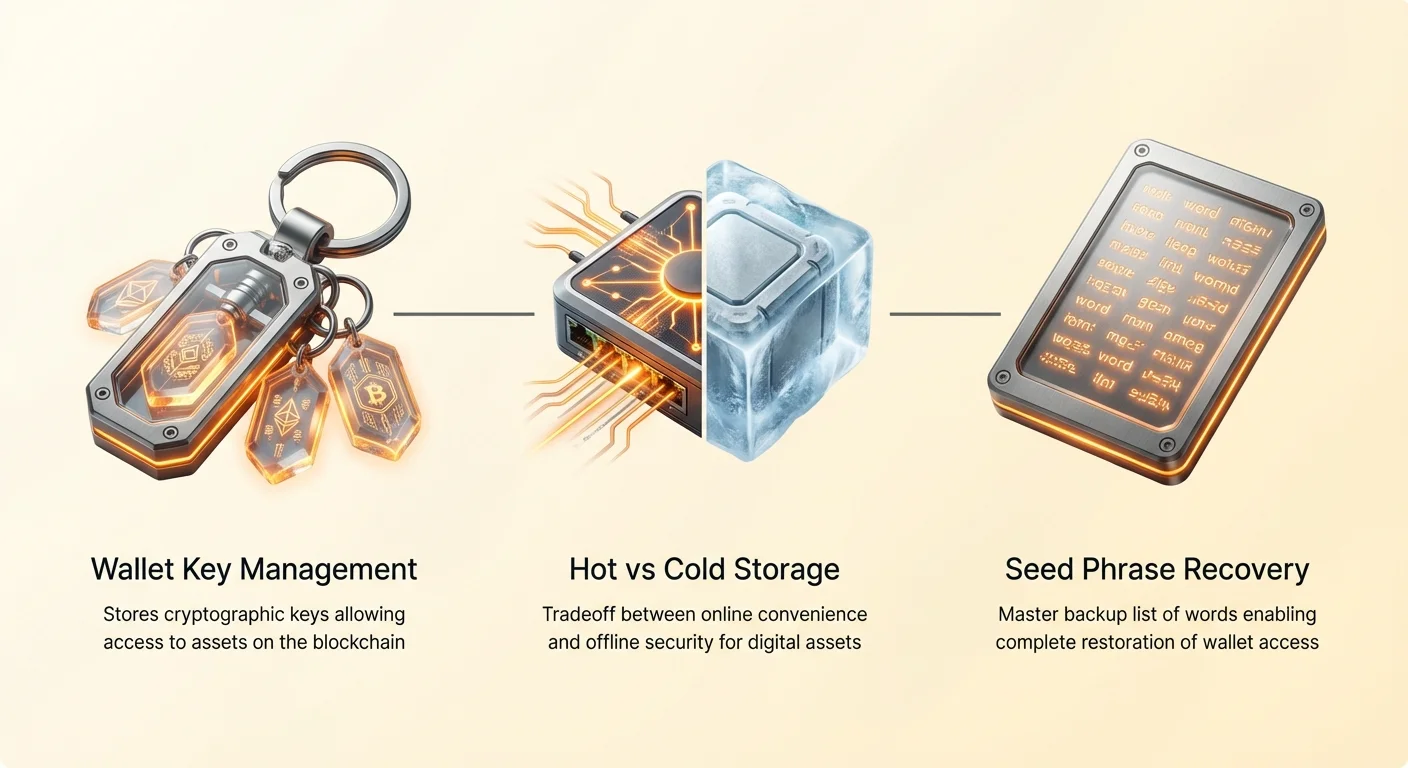
Navigating the complex landscape of cryptocurrency storage requires a fundamental understanding of how digital assets are secured and managed. Unlike a physical wallet that holds cash, a crypto wallet does not store the actual tokens. Instead, it safeguards the cryptographic keys that grant access to assets residing on the blockchain.
This distinction is crucial for every user, from the casual investor to the institutional trader. The "wallet" is essentially a keychain management system. If you lose access to these keys, or if a malicious actor gains copies of them, the funds are irretrievable. This reality places the entire burden of security on the user, creating a unique responsibility known as self-custody.
Choosing the right storage solution is not a binary decision but a spectrum of trade-offs between convenience and security. High-frequency traders require rapid access to liquidity, while long-term investors prioritize impenetrable security layers that may be slower to access. This divergence has led to a diverse ecosystem of wallet types, ranging from mobile applications to physical hardware devices.
The annual selection matrix provides a framework for evaluating these tools based on current technological standards and security threats. By categorizing wallets into hardware, mobile, desktop, and browser-based solutions, users can build a tiered security strategy. This approach typically involves using multiple wallet types simultaneously, assigning each a specific role based on the value it secures and the frequency of its use.
Core Architecture of Crypto Storage
To make an informed choice, one must first understand the underlying architecture of crypto wallets. The primary categorization lies in the distinction between custodial and non-custodial services. A custodial wallet operates like a traditional bank account where a third party, such as an exchange, manages the security keys. While this offers recourse if passwords are lost, it introduces significant counterparty risk. For a full analysis of the trade-offs, review the spectrum of custody risks.
The Mechanics of Self-Custody
Non-custodial wallets, the focus of this matrix, place full control in the hands of the user. These wallets generate a pair of cryptographic keys: a public key, which serves as the address for receiving funds, and a private key, which is required to sign transactions. The security of the entire system hinges on keeping the private key secret.
Most modern non-custodial wallets use a hierarchical deterministic (HD) architecture. This technology allows the generation of a "seed phrase," usually a list of 12 or 24 random words. This phrase acts as a master key, allowing the user to recover all private keys and addresses on a new device if the original is lost or destroyed. Learn more about securing and recovering your seed phrase.
Hot Versus Cold Storage
The second major architectural divide is between "hot" and "cold" storage. Hot wallets are software applications connected to the internet. They facilitate quick transactions and interactions with online services but are inherently vulnerable to remote hacking attempts, malware, and phishing attacks.
Cold storage refers to keeping private keys on a device or medium that is never connected to the internet. This isolation creates an air gap, a physical barrier that prevents online attackers from reaching the keys. Cold storage is the gold standard for protecting significant amounts of capital against digital theft, though it sacrifices the immediacy of transaction execution.
Hardware Wallets: The Security Gold Standard
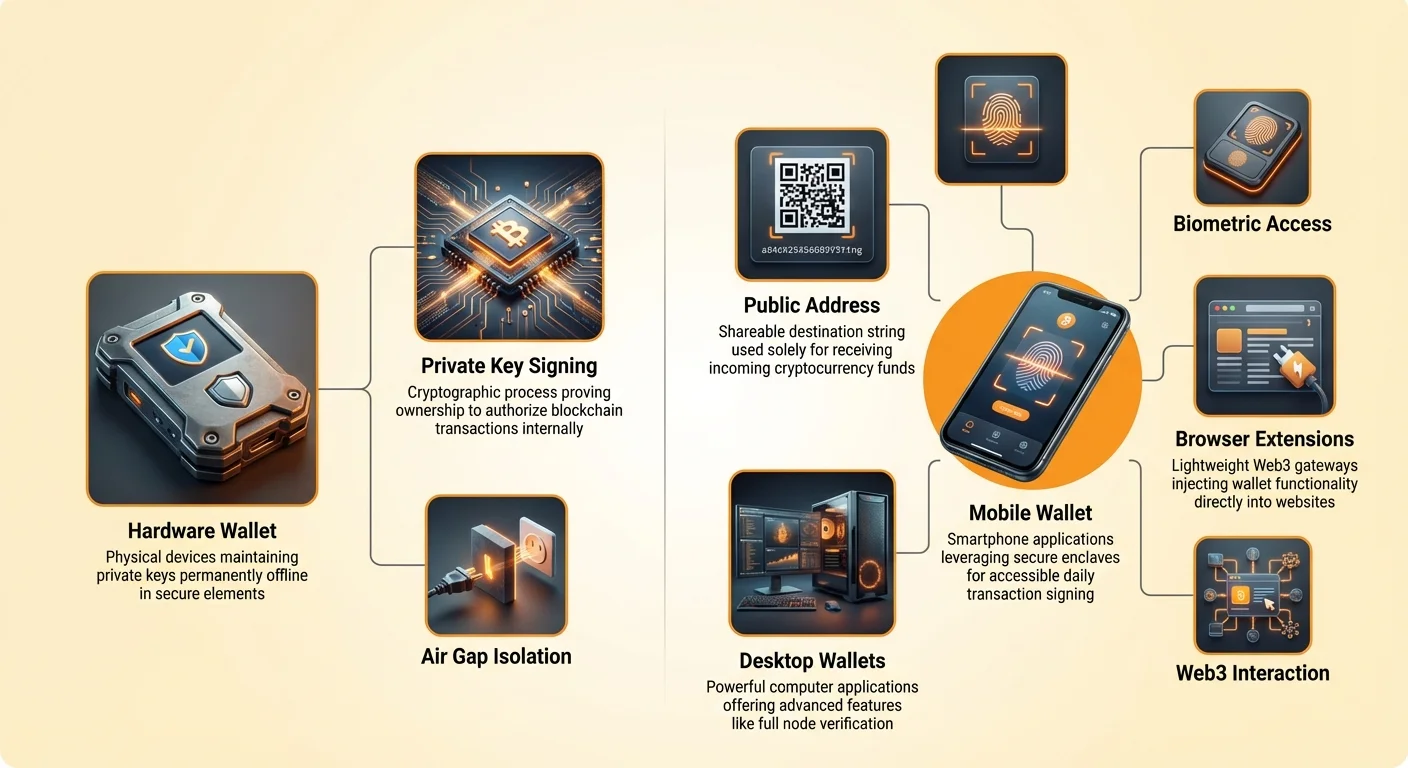
Hardware wallets represent the pinnacle of consumer-grade security for cryptocurrency. These are physical electronic devices designed for the sole purpose of generating and storing private keys offline. A deep dive into hardware wallet security reveals how they isolate signing functions from the host computer. Even when connected to a computer to manage funds, the private keys never leave the device's secure element.
Operational Security and Isolation
When a user initiates a transaction on a computer, the unsigned transaction data is sent to the hardware wallet. The device signs the transaction internally using the private key and returns only the valid digital signature to the computer. This process ensures that even if the host computer is infected with malware or keyloggers, the secrets remain compromised.
Advanced models now incorporate features like touchscreens for verifying transaction details directly on the device. This protects against "man-in-the-middle" attacks where malware might alter the recipient address on the computer screen. By confirming the address on the hardware wallet's trusted display, users ensure they are sending funds to the correct destination.
Target Use Cases
These devices are essential for anyone holding a significant portion of their net worth in crypto. They are best suited for "cold" funds—assets that are meant to be held for months or years without moving. While they can interact with decentralized finance (DeFi) protocols, the requirement to physically approve every transaction makes them less convenient for high-frequency trading.
The primary risk with hardware wallets is physical loss or damage. However, as long as the user retains the backup seed phrase, the device itself is replaceable. The device is usually protected by a PIN code, ensuring that if it is stolen, the thief cannot access the funds without the code, giving the owner time to recover their wallet elsewhere.
Mobile Wallets: Accessibility and Daily Use
Mobile wallets have evolved into powerful tools that balance reasonable security with extreme convenience. These applications turn a smartphone into a crypto management interface, leveraging the device's built-in security features. They are the primary vehicle for adoption in regions relying on mobile-first financial infrastructure.
Biometrics and Secure Enclaves
Modern smartphones contain secure enclaves—specialized hardware chips isolated from the main operating system. Many high-quality mobile wallets utilize this hardware to encrypt private keys. This integration allows users to authorize transactions using biometric data, such as fingerprints or facial recognition, adding a robust layer of security that is difficult to bypass remotely.
Additionally, mobile wallets are uniquely positioned to bridge the gap between digital assets and the physical world. The inclusion of cameras allows for instant QR code scanning, making these wallets the preferred choice for merchant payments and peer-to-peer transfers. They act as the "checking account" of the crypto world, holding smaller amounts for daily operations.
Connectivity and Risks
Despite their advanced features, mobile wallets are considered "hot" wallets. They are perpetually connected to cellular networks and Wi-Fi, exposing them to a wider array of attack vectors than cold storage. Risks include SIM swapping attacks, where hackers hijack a phone number to bypass security checks, and malicious apps that might screen-record or log keystrokes.
Users should be wary of downloading fake wallet applications. App stores, while moderated, occasionally host malicious software disguised as popular wallets. It is vital to download applications only from official sources. For enhanced privacy, some mobile wallets also offer features like Tor integration or the ability to connect to a user's own node.
Desktop Wallets: Power User Functionality
Desktop wallets serve a specific niche for users who require robust portfolio management features and interface complexity that mobile screens cannot accommodate. Installed directly on a PC or laptop, these applications offer a middle ground between the mobility of phone apps and the security of hardware devices.
Advanced Features and Privacy
A key advantage of desktop environments is the ability to run a full node. Software like Bitcoin Core downloads the entire blockchain history, allowing the user to verify their own transactions without trusting a third-party server. This provides the highest level of privacy and trustlessness, aligning perfectly with the ethos of decentralized currency.
Desktop wallets often integrate advanced privacy tools. For example, some wallets support CoinJoin transactions, which mix a user's coins with others to obscure the transaction history. Others allow for precise coin control, letting users select exactly which unspent transaction outputs (UTXOs) to spend, optimizing for tax purposes or privacy.
Vulnerability Profile
The desktop environment is generally more susceptible to malware than mobile operating systems due to the open nature of personal computers. Keyloggers, clipboard hijackers, and ransomware pose significant threats to desktop wallets. A clipboard hijacker, for instance, detects when a crypto address is copied and pastes a hacker's address instead.
To mitigate these risks, many desktop wallets now support hardware wallet integration. In this setup, the desktop app acts merely as a user interface for viewing balances and constructing transactions, while the signing of the transaction remains offline on the hardware device. This hybrid approach combines the desktop's powerful interface with the hardware wallet's security.
Browser Extensions: The Web3 Gateway
Browser extension wallets have become the standard interface for the decentralized web (Web3). These lightweight programs integrate directly into browsers like Chrome or Firefox, allowing users to interact seamlessly with decentralized exchanges (DEXs), NFT marketplaces, and lending protocols.
Ecosystem Interaction
Unlike standalone apps, extension wallets are designed to "inject" themselves into websites, enabling safe DApp interaction. When a user visits a Web3-enabled site, the wallet detects the connection request, allowing the user to log in with their crypto address. This functionality is essential for the modern DeFi ecosystem, enabling complex interactions like staking, swapping, and voting in DAOs (Decentralized Autonomous Organizations).
Support for multiple blockchains is a standard feature in this category. A single extension often manages assets across Ethereum, Polygon, Binance Smart Chain, and other EVM-compatible networks. This multi-chain capability simplifies the user experience, negating the need to install different software for every network.
Security Considerations
Browser extensions are considered the "hottest" of hot wallets. They live within the web browser, an environment frequently targeted by exploits and malicious scripts. Phishing is the most prevalent threat here; attackers create fake websites that look identical to legitimate DeFi platforms to trick users into approving malicious transactions.
Because of these risks, it is highly recommended to use a browser extension in conjunction with a hardware wallet. The extension serves as the bridge to the website, but the private keys remain on the USB device. When the website requests a transaction, the user must physically confirm it on the hardware wallet, preventing remote theft even if the browser is compromised.
Paper Wallets: The Analog Alternative
Paper wallets represent the ultimate form of cold storage, taking the concept of "offline" literally. A paper wallet is simply a physical printout of a public address and its corresponding private key, often represented as QR codes. Since paper cannot connect to the internet, it is immune to cyberattacks.
Generation and Protocol
Creating a secure paper wallet requires rigorous operational security. The keys must be generated on a computer that is disconnected from the internet—preferably one that will never touch the internet again. Once the website code is loaded, the user disconnects the network, generates the keys, and prints them using a printer that is hardwired to the computer, not connected via Wi-Fi.
After printing, the digital trace must be wiped. This method is popular for long-term "deep freeze" storage or for giving cryptocurrency as a physical gift. It costs nothing to create and requires no firmware updates or battery maintenance, unlike hardware wallets.
Physical Vulnerabilities
While immune to hackers, paper wallets are highly vulnerable to physical degradation. Paper can rot, burn, fade, or be eaten by pests. Water damage can make the ink run, rendering the keys unreadable. Furthermore, unlike HD wallets, paper wallets often use a single key pair.
Spending from a paper wallet can also be risky for beginners. When the private key is imported into a software wallet to send a partial amount, the user must understand how "change addresses" work. If not handled correctly during the import process, the remaining funds might be sent to a change address the user does not control, leading to a total loss of the remaining balance.
Lightning Wallets: Speed and Scalability
The Bitcoin Lightning Network has necessitated a new breed of wallet designed for microtransactions. Review Lightning wallet velocity and liquidity trade-offs. Lightning wallets operate on a "Layer 2" protocol sitting on top of the main Bitcoin blockchain. They enable instant settlement with fees that are a fraction of a cent, making Bitcoin viable for buying coffee or streaming payments.
Channel Management
Lightning wallets work by opening payment channels. While some advanced users manage their own channels and liquidity, many modern mobile Lightning wallets automate this process. They provide a seamless experience where the user sees a unified balance, while the app handles the complex cryptography of off-chain settlement in the background.
Custodial vs. Self-Custodial Lightning
In the Lightning ecosystem, the trade-off between ease of use and custody is pronounced. Custodial Lightning wallets offer the easiest onboarding, as the service provider manages the channel liquidity. However, this returns to the model of trusting a third party.
Self-custodial Lightning wallets run a light node on the user's mobile device. They offer better privacy and control but may require the user to manage inbound liquidity or pay setup fees for channel creation. These wallets are ideal for keeping small amounts of spending money, separate from one's main savings, much like cash in a physical pocket.
The Selection Matrix Strategy
Selecting the right wallet is not about finding one perfect tool, but about arranging a suite of tools that fit your financial profile. Users should categorize their holdings based on value and intended usage frequency. This creates a "Selection Matrix" where different wallets serve different tiers of wealth.
| Feature | Hardware Wallet | Mobile Wallet | Desktop Wallet |
|---|---|---|---|
| Primary Use | Long-term savings | Daily spending | Portfolio management |
| Security Level | High (Cold) | Medium (Hot) | Medium/High |
| Cost | $50 - $200+ | Free | Free |
| Convenience | Low | High | Medium |
| Recovery | Seed Phrase | Seed Phrase | Seed Phrase |
| Web3 Ready | Via integration | Yes | Yes |
| Key Risk | Physical loss | Malware/Theft | Malware |
Implementing a Tiered System
A robust strategy involves using a hardware wallet as the "vault." This device holds 80-90% of your portfolio—funds that you do not plan to trade or spend in the immediate future. The seed phrase for this device should be secured in metal to protect against fire and stored in a separate physical location.
For the remaining 10-20%, a mobile or browser extension wallet acts as the "checking account." Transfers are made from the hardware vault to the mobile wallet only when necessary. This limits the potential loss from a phone hack or phishing attack to a manageable amount, while keeping the bulk of the wealth secure behind the air gap of the hardware device.
Conclusion
The landscape of cryptocurrency wallets in 2025 offers a solution for every type of user, but it demands active participation in security practices. The transition from traditional finance to self-custody requires a shift in mindset. Security is no longer a feature provided by a bank; it is a process enacted by the user. Whether utilizing the impenetrable isolation of a hardware wallet or the friction-less speed of a mobile Lightning app, the principles remain the same: protect the private keys at all costs.
Ultimately, the best wallet is one that you know how to use correctly. Complexity is the enemy of security; a complex setup that leads to user error is more dangerous than a simple setup used effectively. By diversifying storage methods across hardware for savings and software for spending, users can achieve a balance that protects their wealth without stifling their ability to participate in the digital economy.
The most secure wallet is not a specific product, but a strategy that combines cold storage for savings with hot wallets for spending.